The NEOTONE Mutant is a stage-ready, standalone digital handpan that also functions as an ergonomic MIDI keyboard. It is capable of playing most of the tones found in acoustic instruments, including open and closed sounds, overtones, and slaps. The instrument is designed to be highly sensitive and responsive to touch.
Function Description:
The NEOTONE Mutant features 11 independent tonefields, which sense the position and strength of a hit to produce different sounds simultaneously. The sensors are highly precise, allowing for a wide dynamic range and easy detection of very light touches to strong slaps. The instrument's body is made of wood and is also touch-sensitive, producing unique sounds. The tonefields are divided into 9 top and 9 bottom hit areas, with 18 separate sounds. There is no sharp boundary between these areas, allowing for continuous sound variation based on where the instrument is hit. The instrument has a maximum of 9 scales to choose from, which can be loaded by holding down a side tonefield and the dome simultaneously.
The NEOTONE Mutant can be used as a MIDI keyboard by connecting it to another MIDI device or computer. Users can define multiple MIDI maps, assigning each tonefield or body section to a different MIDI note. Each tonefield can be adjusted to send and receive MIDI notes, and users can choose to play audio simultaneously or not. The instrument also has a recording function, allowing users to record audio via a WiFi connection and then play, download, or share the recordings through the interface.
Important Technical Specifications:
- Operational Temperature: 0 - 40°C
- Weight: 3.7 kg (black walnut), 4.2 kg (natural ash)
- Dimensions: 47 cm diameter, 16 cm height
- Battery Discharge: 8 hours
- Full Charge: 4 hours
- Tonefield Sensors Weight Precision: < 1 gr.
- Tonefield Sensors Position Accuracy: < 1 cm
- Audio Latency: ~ 5ms
- DAC: 24bit 384kHz 2.1Vrms SNR: 112dB THD: -93 dB
- Power Supply: 12V 24W cabled power supply (included), internal battery for approximately 8 hours of use.
Usage Features:
- Turning On/Off: Hold the POWER button for 2 seconds to turn on (LED above button lights up). Hold for 3 seconds to turn off. The instrument takes about 30 seconds to completely turn off, during which it checks for software and scale updates, indicated by blinking RED and GREEN lights on the back panel.
- Charging: Connect the DC 12V adapter to charge the battery. It is recommended to charge from a power supply during live performances to avoid battery discharge.
- Interface: The instrument connects to an online interface (https://digitalhandpan.com/setup/) via WiFi. This interface allows users to configure settings such as sensitivity, noise thresholds, MIDI maps, and custom scales. The interface is accessible via web browser on computers and smartphones.
- Hotkeys:
- Select Scale: Hold DOME and a side tonefield simultaneously for 2 seconds.
- Select MIDI Set: Hold DING and a side tonefield simultaneously for 2 seconds.
- Tonefields: The instrument has 11 tonefields, with DING and DOME being the center tonefields producing the deepest notes. Numbers 1-9 represent side tonefields from deepest to highest notes. On Mutant models, each edge tonefield (1-9) has an extra field on the upper half for additional sounds and notes.
- Orientation: There are 4 inlay marker points on the instrument's body for orientation. Double marker points indicate the highest note and have a built-in indicator light.
- Scale Selection: The instrument can store up to 9 scales. Pressing a side tonefield and the dome simultaneously displays the scale name. Holding for an additional 2 seconds loads the scale. A spinning arrow icon on the LCD indicates loading, and the status icon LED turns orange.
- Custom Scale Editing: Users can create custom scales by dragging and dropping notes onto a blueprint of the instrument in the SCALES menu point of the interface. Source samples for notes can be adjusted for harmony, and gain (volume) correction can be applied.
- Hotkeys Editing: Hotkeys can be assigned to different scales or MIDI sets. Each tonefield can be assigned a separate scale, allowing for up to nine scales to be accessed via hotkeys.
- Recording: Hold down the DOME for 3 seconds to start or stop a recording. Recordings appear on a list in the RECORD menu point of the interface.
- Recording Settings:
- Auto Stop: Recording stops after 10 seconds of inactivity.
- MP3 Compression: Recordings can be automatically compressed to MP3 (default) or stored as WAV.
- MP3 Quality: Bitrate can be set between 128 to 320 kbps.
- Sound Settings:
- Volume: Adjusts the master volume (0 - 200%).
- Velocity Hardness: Adjusts the dynamic response to hits.
- Dynamic Range: Adjusts the range between soft and loud sounds.
- Stereo Environment: Adjusts stereo width (70% for headphones, 100% for loudspeakers).
- Sustain: Adjusts the duration of notes.
- Mute: Mutes the instrument.
- Tonefield Polyphony: Adjusts the density of a tone when hitting the same tonefield repeatedly.
- Body Crossfade Softness: Adjusts the blend of body sounds.
- Tuner: Default setting is 440 Hz. Modifying it loads the current scale.
- Force Mute: Forces the instrument to play closed sounds, recommended with a foot pedal.
- Mirror Assigned Notes: Switches the lowest side note from the right to the left side.
- Sensor Settings:
- Sensitivity Curves: Adjusts the dynamic characteristic of tonefields and body tones for both handpan and MIDI.
- Amplification (Gain): Adjusts the gain of tonefields and body tones for both handpan and MIDI.
- Body Sensors Enabled: Mutes body tones when switched off for handpan, and prevents sending body MIDI notes when switched off for MIDI.
- Threshold Settings:
- Noise Threshold for Tonefields: Default 50%. Increase if using a handpan stand or playing strongly; decrease for soft playing.
- Noise Threshold for Body: Default 20%. Increase if using a handpan stand or playing strongly; decrease for extra sensitivity (may cause crosstalk below 20%).
- Noise Threshold for Trigger PEDAL 1/2: Sets the threshold for kick trigger pedals.
- Control Settings:
- Control Input (Right/Mono, Left): Allows pairing sliders and switches with back panel knobs or foot pedals to adjust settings physically without WiFi.
- MIDI Input/Output Enabled: Enables or disables MIDI input and output messages.
- MIDI Thru Enabled/Filtered: Sends input MIDI messages to output, with an option to filter by channels.
- MIDI Active Sensing Messages: Enables or disables active sensing messages.
- Shutdown Time on Battery Mode/Plugged: Sets auto-switch off duration when on battery or plugged in.
- MIDI Settings:
- MIDI Maps: Configure MIDI messages for each tonefield. Up to 9 MIDI sets can be defined and named.
- Note Off Method: Enables handpan style (sends MIDI OFF when a tonefield is released).
- Bottom Panel Controls:
- POWER Button (1): Turns instrument on/off.
- CHARGE Input (2): DC 12V 2A input for charging.
- PHONES Output (3): 1/4" TRS output for headphones.
- VOLUME Knob (4): Adjusts headphone volume.
- LINE OUT (5): Unbalanced line outputs (R/Mono, L).
- MIDI IN/OUT (6): Connects to external MIDI devices.
- MIDI USB (7): Connects to external MIDI devices via USB.
- TRIG/EXPR (8): Connects to external trigger or expression pedal.
- BLUE LIGHT (9): Indicates DC charger adapter connected.
- GREEN/RED LIGHT (10): Green indicates instrument is on, Red indicates instrument is turning off.
Maintenance Features:
- Software Updates: The instrument checks for software and scale updates during shutdown.
- Troubleshooting: The manual provides guidance for common issues such as no sound, instrument not turning on/off, low volume, and WiFi connection problems.
- Battery Management: The battery indicator shows charge level (green above 20%, red below 20%). "Slow charging detected" message indicates a need to disconnect and reconnect the USB charger.
- Case: A semi-hard case is included for carrying and protecting the instrument. The instrument should be placed upside down in its case, grasping at the marked area, with a soft ring inside to protect the upper side.

 Need help?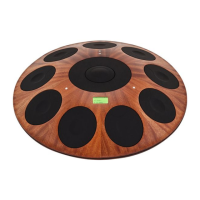

 To Next Page
 General