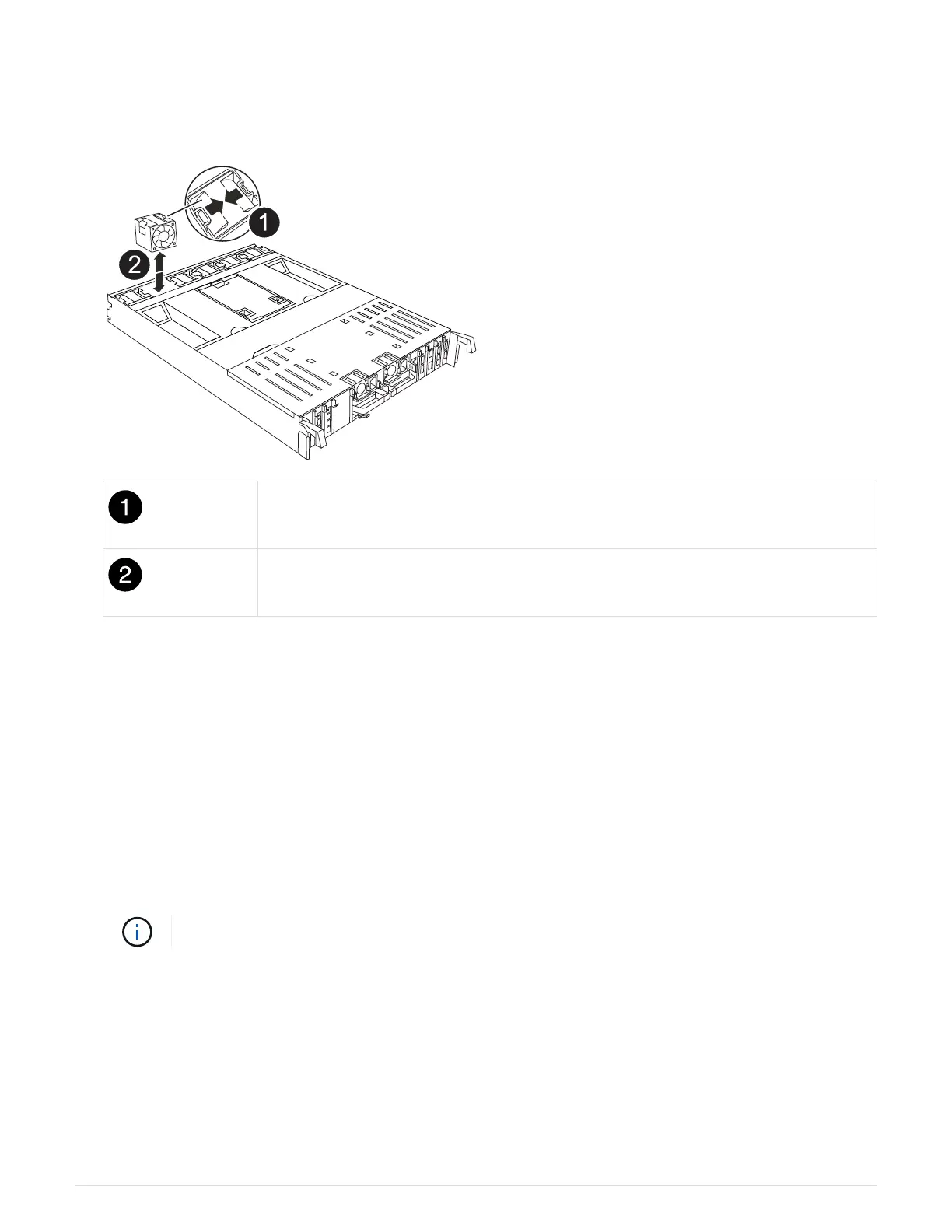
1. Identify the fan module that you must replace by checking the console error messages or by locating the lit
LED for the fan module on the motherboard.
2. Remove the fan module by pinching the locking tabs on the side of the fan module, and then lifting the fan
module straight out of the controller module.
Fan locking tabs
Fan module
3. Align the edges of the replacement fan module with the opening in the controller module, and then slide the
replacement fan module into the controller module until the locking latches click into place.
Step 4: Reinstall the controller module
Reinstall the controller module and reboot it.
1. Ensure the air duct is completely closed by rotating it down as far as it will go.
It must lie flush against the controller module sheet metal.
2. Align the end of the controller module with the opening in the chassis, and then gently push the controller
module halfway into the system.
Do not completely insert the controller module in the chassis until instructed to do so.
3. Recable the system, as needed.
If you removed the transceivers (QSFPs or SFPs), remember to reinstall them if you are using fiber optic
cables.
4. Complete the reinstallation of the controller module:
a. Firmly push the controller module into the chassis until it meets the midplane and is fully seated.
57



 To Next Page