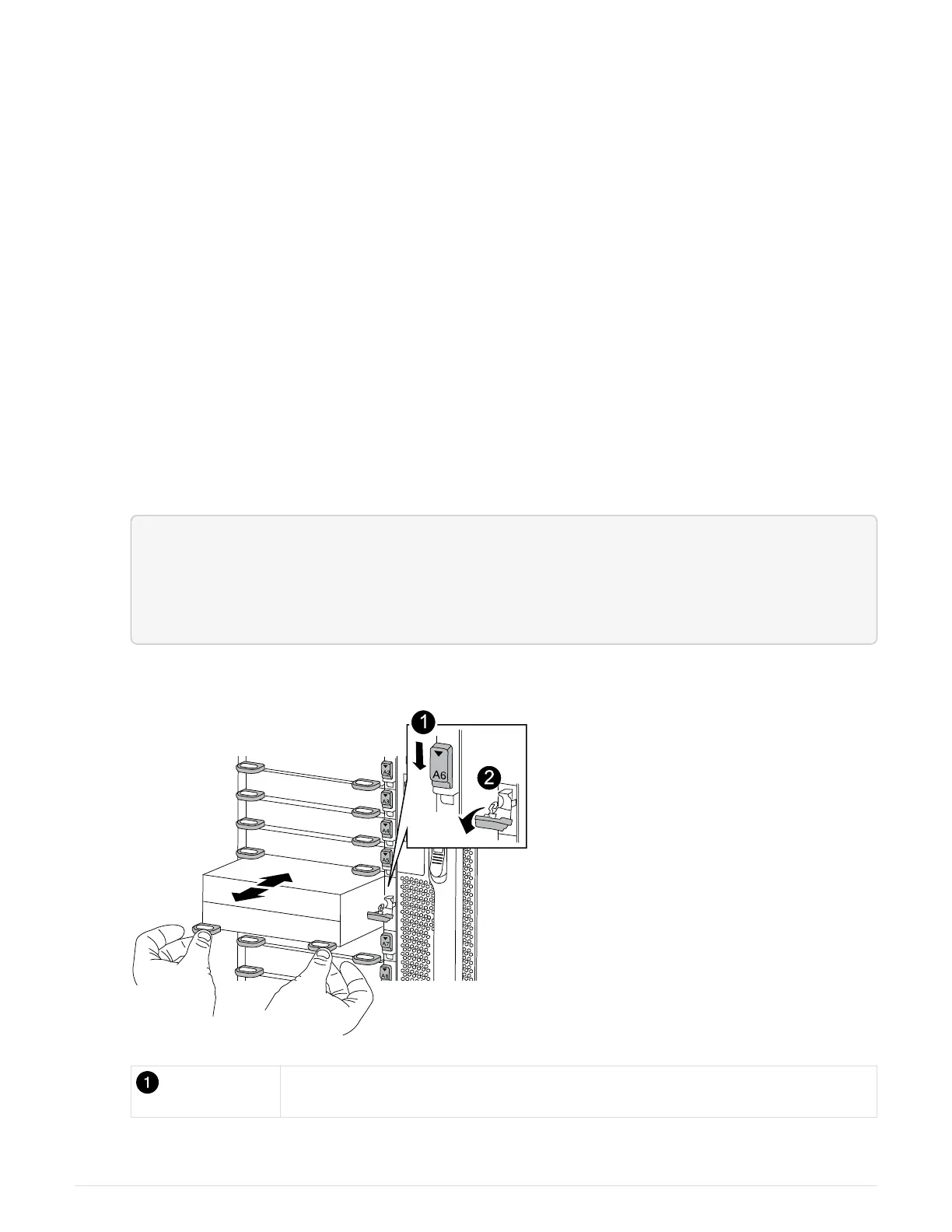
a. Align the module with the edges of the chassis opening in slot 6.
b. Gently slide the module into the slot until the lettered and numbered I/O cam latch begins to engage
with the I/O cam pin, and then push the I/O cam latch all the way up to lock the module in place.
Step 3: Replace a NVRAM DIMM
To replace NVRAM DIMMs in the NVRAM module, you must remove the NVRAM module, open the module,
and then replace the target DIMM.
1. If you are not already grounded, properly ground yourself.
2. Remove the target NVRAM module from the chassis:
a. Depress the lettered and numbered cam button.
The cam button moves away from the chassis.
b. Rotate the cam latch down until it is in a horizontal position.
The NVRAM module disengages from the chassis and moves out a few inches.
c. Remove the NVRAM module from the chassis by pulling on the pull tabs on the sides of the module
face.
<div class="aspect-ratio"><iframe frameborder="1" height="400"
scrolling="auto"
src="https://netapp.hosted.panopto.com/Panopto/Pages/embed.aspx?id=22
8cbd14-4cb2-49b5-88f1-ae78004b9d84" width="711"> </iframe></div>
Animation - Replace the NVRAM module
Lettered and numbered I/O cam latch
771



 To Next Page