Controller module cover locking button
Step 3: Replace the RTC battery
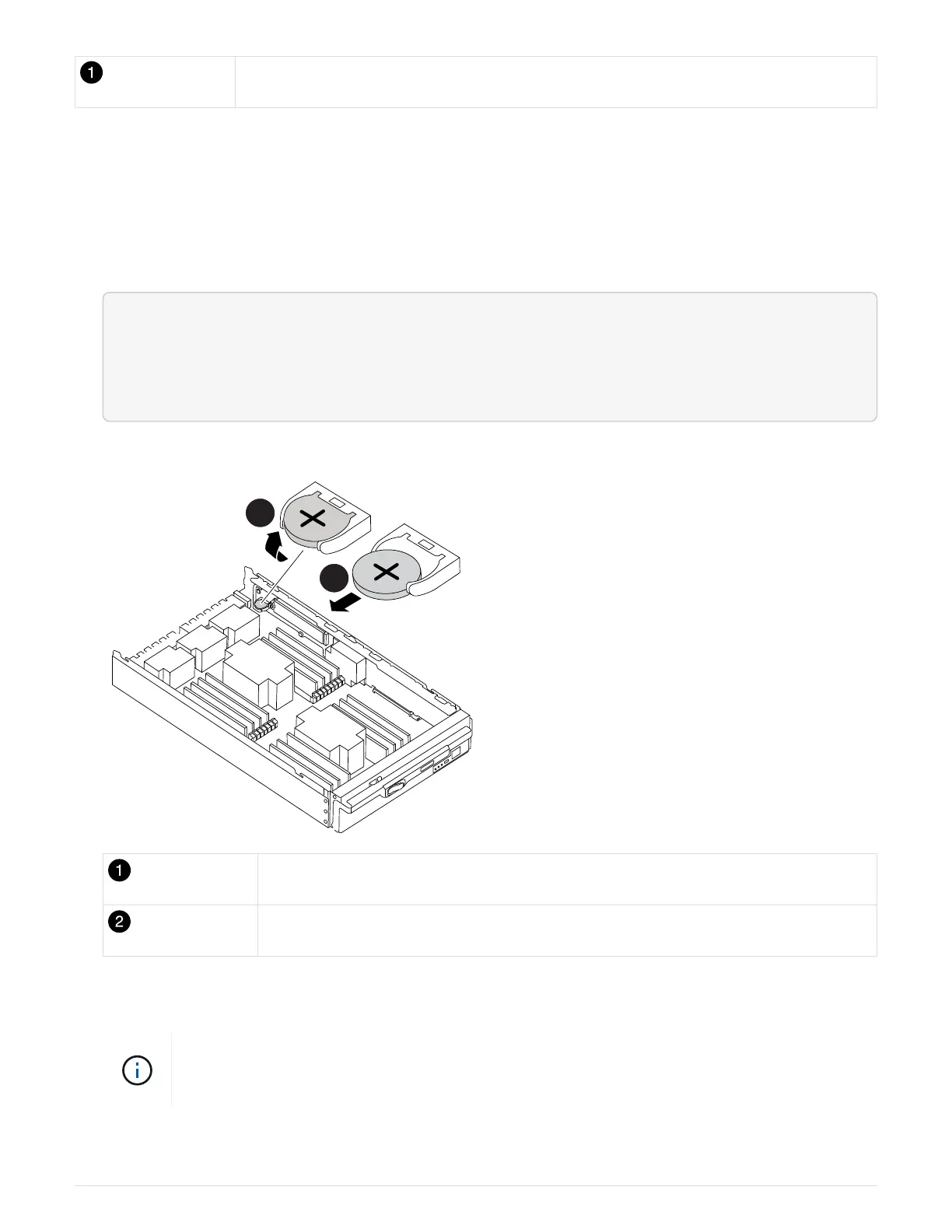
To replace the RTC battery, you must locate the failed battery in the controller module, remove it from the
holder, and then install the replacement battery in the holder.
1. If you are not already grounded, properly ground yourself.
2. Locate the RTC battery.
<div class="aspect-ratio"><iframe frameborder="1" height="400"
scrolling="auto"
src="https://netapp.hosted.panopto.com/Panopto/Pages/embed.aspx?id=3b977
f96-3ebb-4b11-9703-ae78004b4add" width="711"> </iframe></div>
Animation - Replace RTC battery
Rotate battery up
Slide battery out from housing
3. Gently push the battery away from the holder, rotate it away from the holder, and then lift it out of the
holder.
Note the polarity of the battery as you remove it from the holder. The battery is marked with
a plus sign and must be positioned in the holder correctly. A plus sign near the holder tells
you how the battery should be positioned.
4. Remove the replacement battery from the antistatic shipping bag.
781



 To Next Page