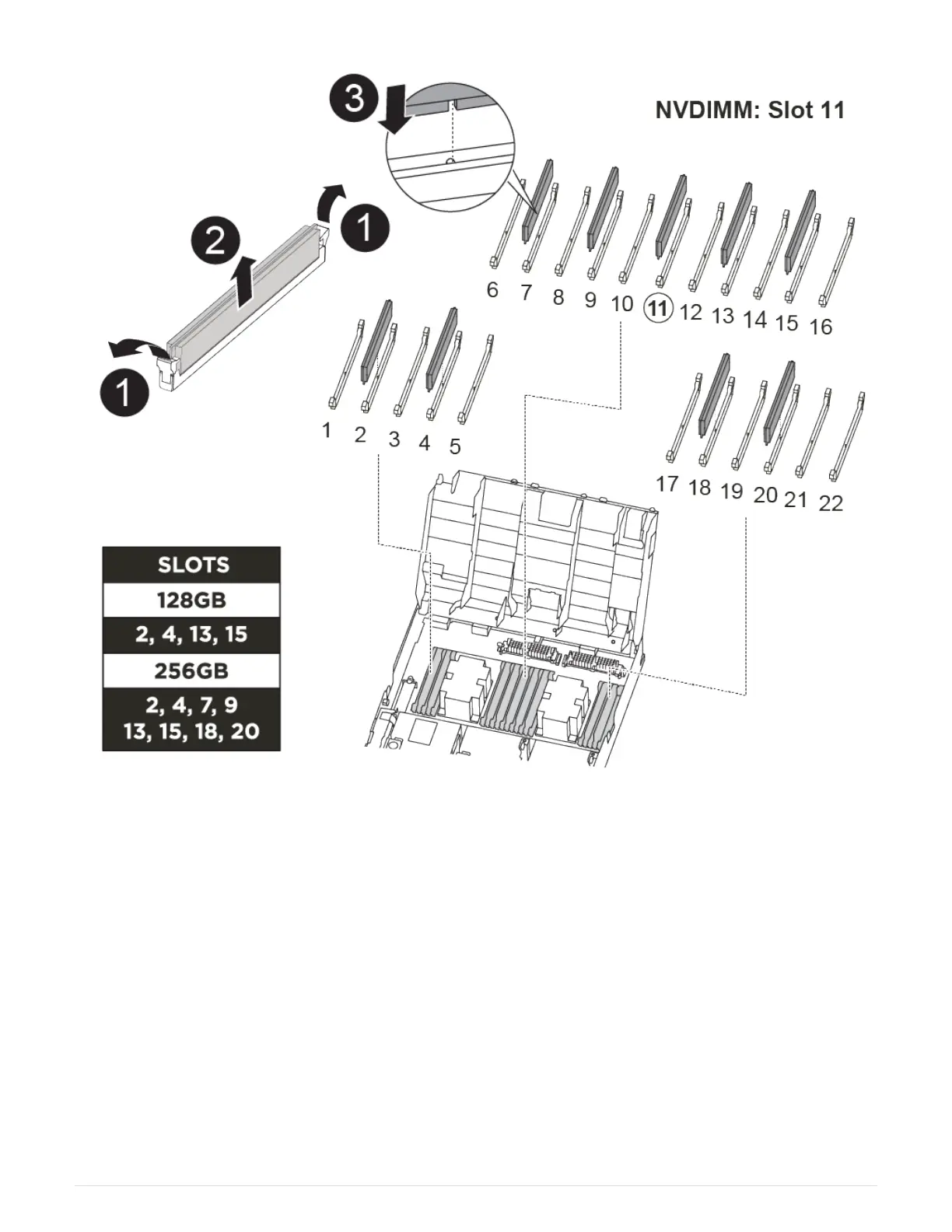
The number and location of DIMMS in your system depends on the model of your system. Refer to FRU map
on the air duct for more information.
• If you have a FAS8300 system, the system DIMMs are located in sockets 2, 4, 13, and 15.
• If you have a FAS8700 system, the system DIMMs are located in slots 2, 4, 7, 9, 13, 15, 18, and 20.
• The NVDIMM is located in slot 11.
Steps
1. Open the air duct:
a. Press the locking tabs on the sides of the air duct in toward the middle of the controller module.
b. Slide the air duct toward the back of the controller module, and then rotate it upward to its completely
open position.
2. Locate the DIMMs on your controller module.
3. Note the orientation of the DIMM in the socket so that you can insert the replacement DIMM in the proper
orientation.
82



 To Next Page