ADSL2+ Modem Router User Manual
64
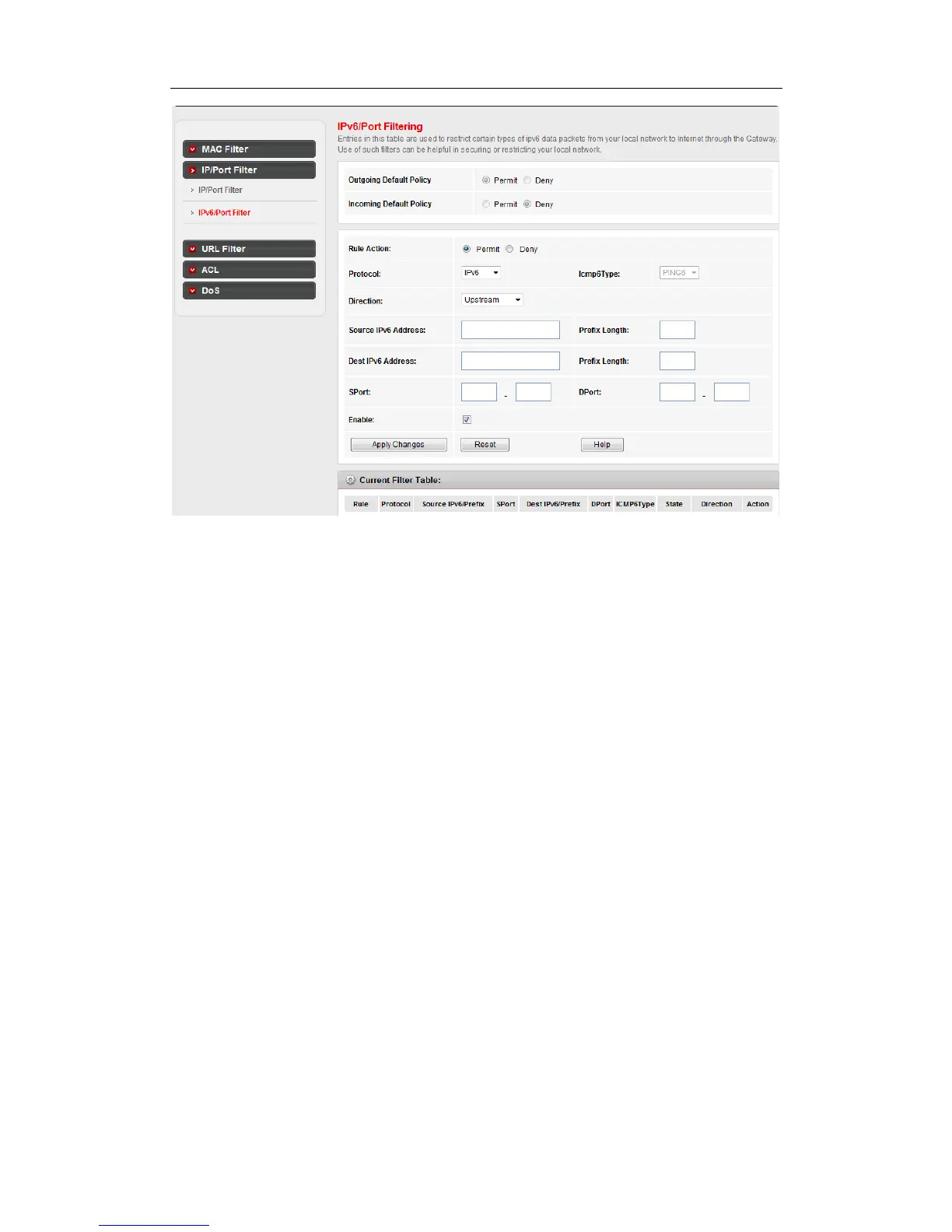
Outgoing Default Action: Display current lan to wan default action
Incoming Default Action: Display current wan to lan default action
Rule Action: Specify the rule action: Permit or Deny
Protocol: Specify the rule protocols: IPv6, ICMP6,TCP or UDP
Icmp6Type: When protocol is selected ICMP6, user specify icmp6type, now only support
PING6
Direction:“Upstream” means lan to wan; “Downstream” meanswan to lan.
Source IPv6 Address: Specify the source ipv6 address
Prefix Length: Specify the source ipv6 address prefix length
Dest IPv6 Address: Specify the destination ipv6 address
Prefix Length: Specify the destination ipv6 address prefix length
Sport: Specify source port when select TCP or UDP
DPort: Specify destination port when select TCP or UDP
Enable: Enable or disable this filter rule
Apply Changes: Add the rule to system
Reset: Reset above items
4.4.3 URL filter



 To Next Page
 Loading...