Wireless-N USB Adapter User Manual
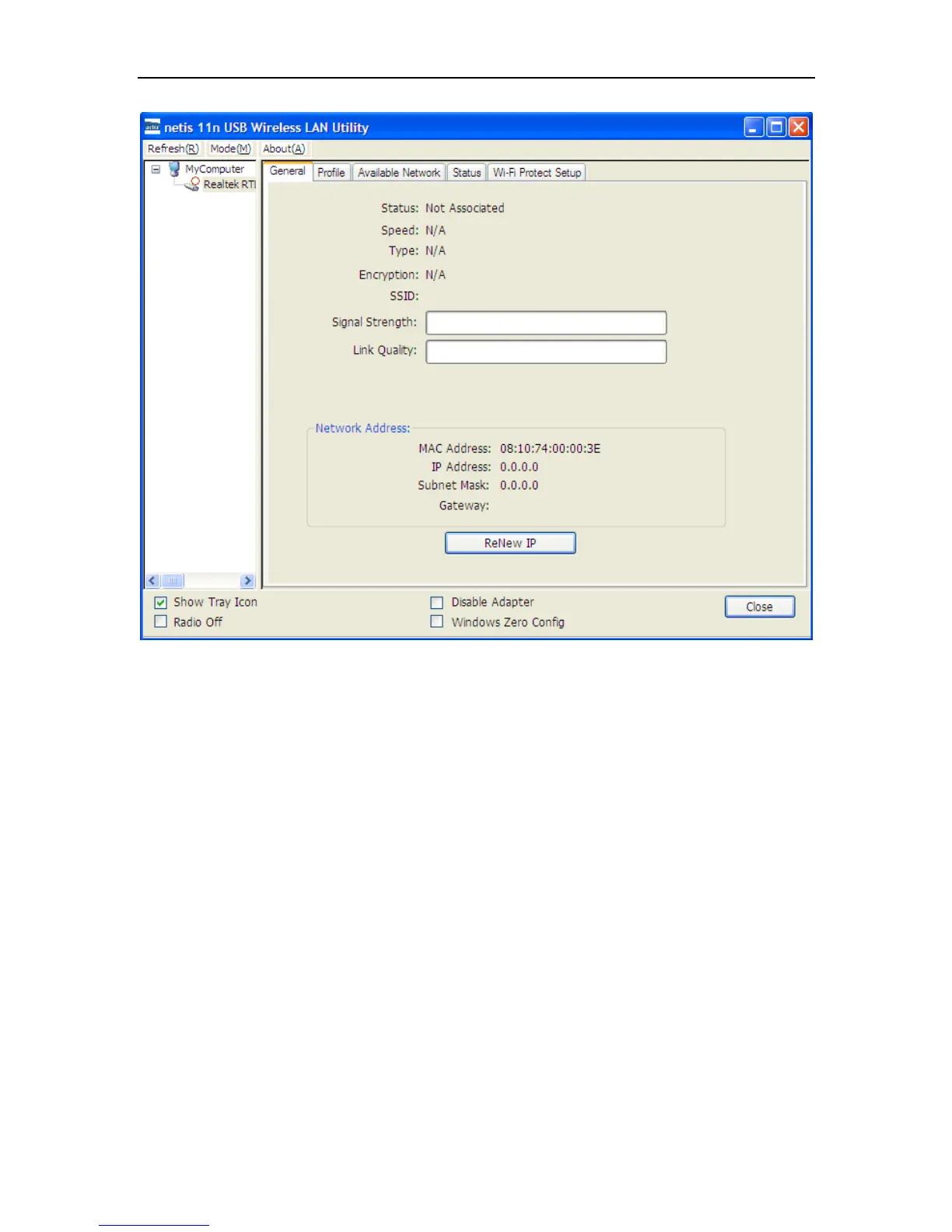
Figure 3-2
General Information
Status: Wireless network Associated, Ad-hoc Mode or Not Associated.
Speed: The data Tx rate and Rx rate of the current connection.
Type: The type of the current wireless connection, Infrastructures or ad hoc
Encryption: Current encryption.
SSID: The unique name of the wireless network to which the wireless adapter is connecting
Signal Strength: The signal quality of the current connection.
Link Quality: The link quality of the current wireless connection.
Network Address
MAC Address: The MAC Address of the Adapter.
IP Address: The IP Address of the Adapter.
Subnet Mask: The Subnet Mask of the Adapter.
Gateway: The Default Gateway address of the Adapter.
Others
Show Tray Icon: Show USB Wireless LAN Utility icon in the windows taskbar notification
area.
Disable Adapter: Disable the wireless adapter.
Radio off: Turn off the radio of the wireless adapter.


 To Next Page