WPS Status: Display WPS (Wi-Fi Protected Setup) status is enabled or not.
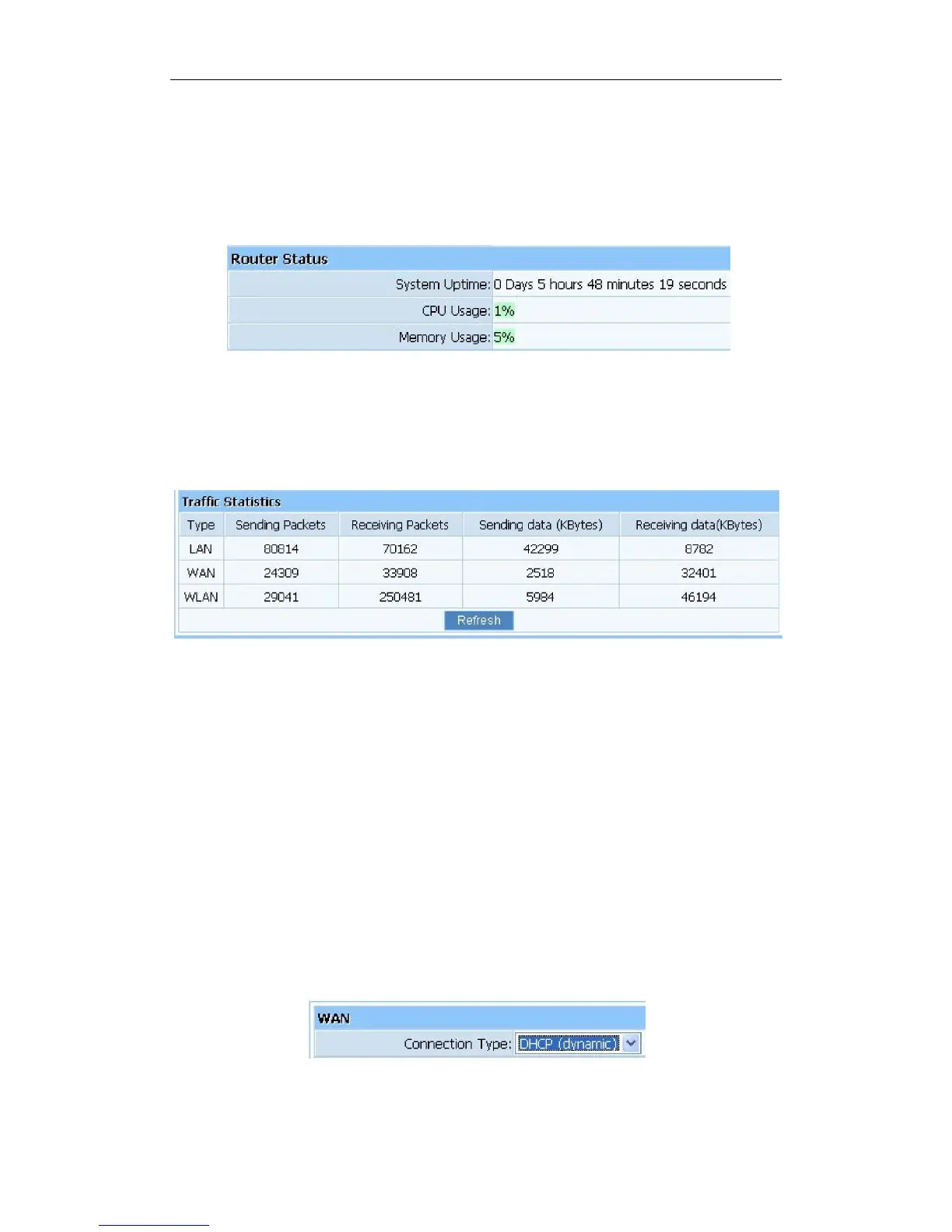
4.1.5. Router Status
This item provides current running information of System.
Figure 4-5
4.1.6. Traffic Statistics
This item provides statistics information about the bits router sends and received.
Figure 4-6
4.2. Quick Setup
Providing you the convenient and simplest method for configure the router, the purpose of this
item is to provide an easy way for you to use it and configure your router to access the Internet
quickly; including ‘DHCP(dynamic)’, ‘PPPoE’, ‘Static’and‘Wireless Configuration’. This is
the most convenient tool for you to configure router.
4.2.1. DHCP (dynamic)
After select this item, you will obtain an IP address from your ISP automatically, those ISP who
supply Cable modem always use DHCP technology.
Figure 4-7



 To Next Page