NETmc Marine DVR Manual-Rev7.2 Dec 2020 37 of 52
© NETmc Marine Ltd 2020
If the DVR is being used for overlay (of Coabis component ident / workpack) then an appropriate
license must be installed for that too.
Link the serial port on the Coabis computer to one of the serial ports on the back of the DVR unit.
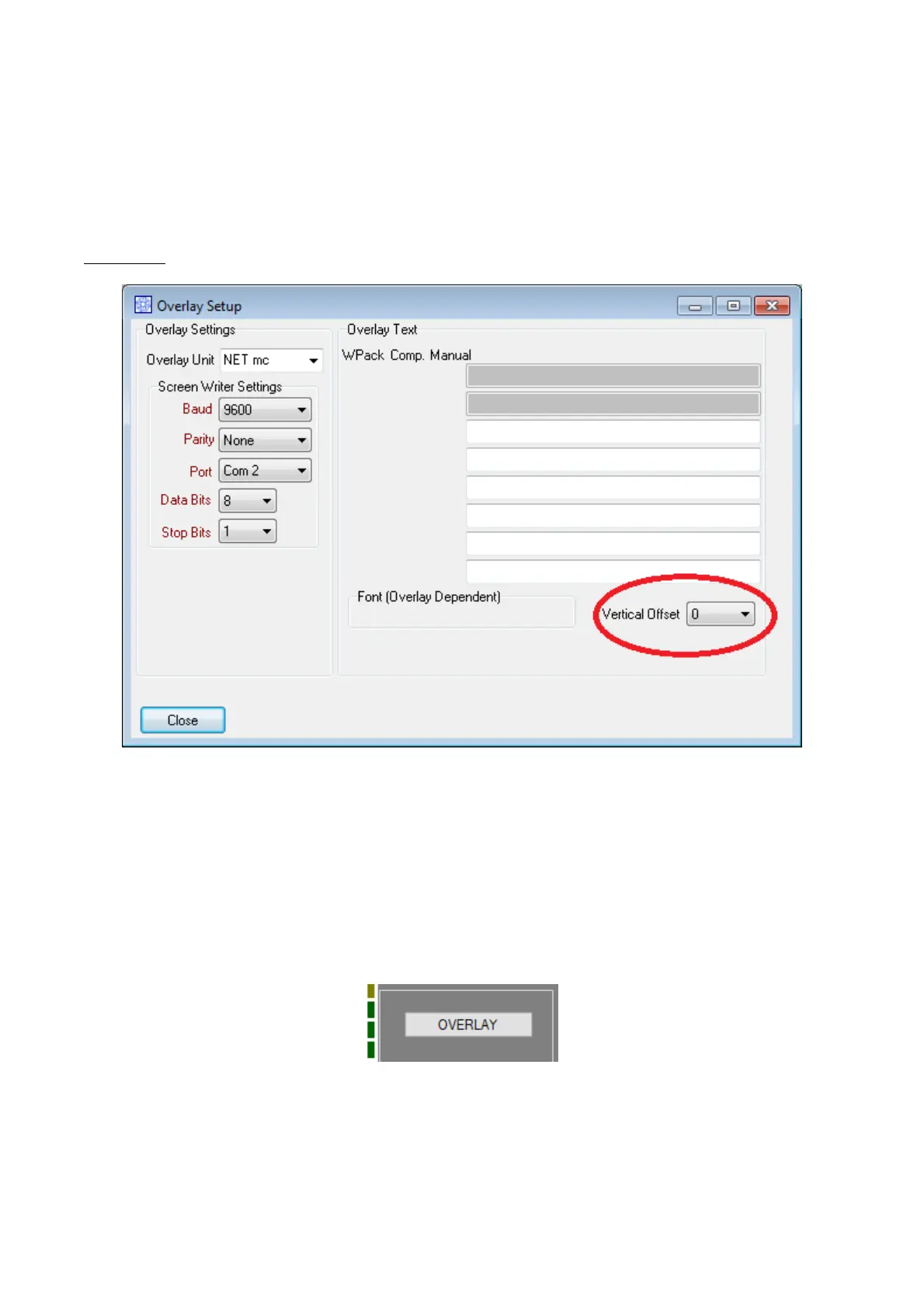
From the Coabis site Tools menu, select Overlay
Select NETmc from the pull down – select a Port number to match the one being used on the
Coabis PC
Remove any vertical line offset
Now the overlay system in the DVR must be setup to accept the incoming string from Coabis. The
Coabis output for NETmc was designed to work with a Taylor Lann serial overlay unit – so it is
missing some parameters which would normally make inputting a serial string easy (for example –
there is no clear start or end character in the string)
To set this up – open the overlay control panel by clicking the ‘Overlay’ button on the main software
interface.
Then when the overlay control page opens, click setup


 To Next Page