
 Need help?
Do you have a question about the NETmc Marine DVR and is the answer not in the manual?
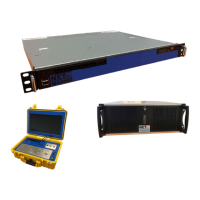
Describes the front panel components and indicators of the 1U and 4U units.
Details the rear panel connections and ports for the 1U unit.
Details the rear panel connections and ports for the 4U unit.
Describes the front panel controls and connectors of the Pelicase unit.
Explains how to start/stop recording and take still images using the software interface.
Details push-button shortcuts on the Pelicase unit and how to identify the active application.
Explains how to undock and manage live video feeds for multi-monitor setups.
Describes aspect ratio controls and information in the undocked video window.
Details settings for file format, record paths, and file naming prefixes.
Explains how to enable/disable features and manage licenses.
Configures the fade-in/out transparency of controls in full-screen mode.
Details settings for real-time clock, notification messages, and serial parser.
Allows assigning unique titles to each video channel for display.
Configures the agent to automatically delete old files to maintain free storage space.
Allows selection and arrangement of video sources for multi-channel display.
Configures network stream recording by setting IP addresses and custom URLs.
Configures serial data extraction, defining start tokens, separators, and terminators.
Configures how parsed serial data is formatted and displayed as overlay text.
Shows how parsed data appears on the overlay screen and can be positioned.
Configures overlay settings to accept incoming strings from Coabis for data display.
Sets up the serial parser to extract data from Coabis strings for overlay.
Configures Taylor Lann overlay emulation properties and extracts data fields.
Selects and positions Coabis fields on the overlay screen.
Enables the display of real-time data from incoming strings on the overlay.
Configures the DVR as a generic video recorder within the NEXUS system.
Configures and selects data variables from NEXUS for overlay display.
Shows how to drag and drop NEXUS variables onto the overlay screen for desired positioning.
Explains methods for synchronizing the DVR clock with EIVA for accurate data.
Describes using NETmc Video Control to start/stop the DVR from EIVA.
Provides guidance on first aid and fire extinguishing methods for lithium batteries.
Covers personal protection, stability, and regulations for transporting batteries.
Lists regulatory information and references for battery transportation and handling.
 General
| Brand | NETmc Marine |
|---|---|
| Model | DVR |
| Category | Recording Equipment |
| Language | English |

 To Next Page