[ENG] UniPing server solution v4/SMS & UniPing server solution v3, User guide -[USS] Sensors Plugin
[USS] Sensors Plugin
–
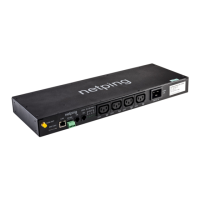
NetPing AC/DIN External Sockets
The amount of plugged in NetPing AC/DIN sockets is limited by the amount of available IO lines only.
All wires are used to plug a socket into a device except a brown one (a white one).The IO line, where a socket AC/
DIN is connected, needs to be switched to an output mode. When a status of an IO line is a logic level 0, there will be
220V on a socket, a voltage will be turned on. When its status is a logic level 1, a socket will bede-energized, a
voltage off.
Controlling through an IO line:
Sensor Flex UniPing server solution v4/SMS,UniPingserver solution v3 Terminal Block
Red +5V
Black GND
Blue (green) One of IO lines – 1 - 8
Controlling through RELAY (NO is normally opened contact, NC is a normally closed contact):
Sensor Flex UniPing server solution v4/SMS,UniPingserver solution v3 Terminal Block
Red +5V
Black GND
Blue (Green) Middle contact of a «Relay» terminal
«+5V» terminal is plugged to a normally opened relay contact (a left terminal in «Relay») by an
auxiliary wire
A relay with normally closed contacts is used for a load commutation in a NetPing AC/DIN. This means having 220 V
on a socket and a voltage turned on when a control wire is not plugged in.
A sensor is packaged with an inseparable cable, withconnectors on the ends. A cable length can be increased with
the help offlat cable extenders of RC-4sensor, which are sequentially plugged one into another. Or it can be done
independently with the help of any wire with a minimum cross section of 0,4 mm
2
. Maximum allowable length of a
flat cable is 100 m.
Important! The brown wire is not used and must stay unplugged!
•
•
When plugging NetPing AC/DIN to a relay:
RELAY "On" there is no voltage in a socket;
RELAY "Off" there is voltage in a socket


 To Next Page