NV-202 VDSL2 Bridge with DIP Switch USER’S MANUAL Ver. A4
10
2.5 Connecting the RJ-11 / RJ-45 Ports
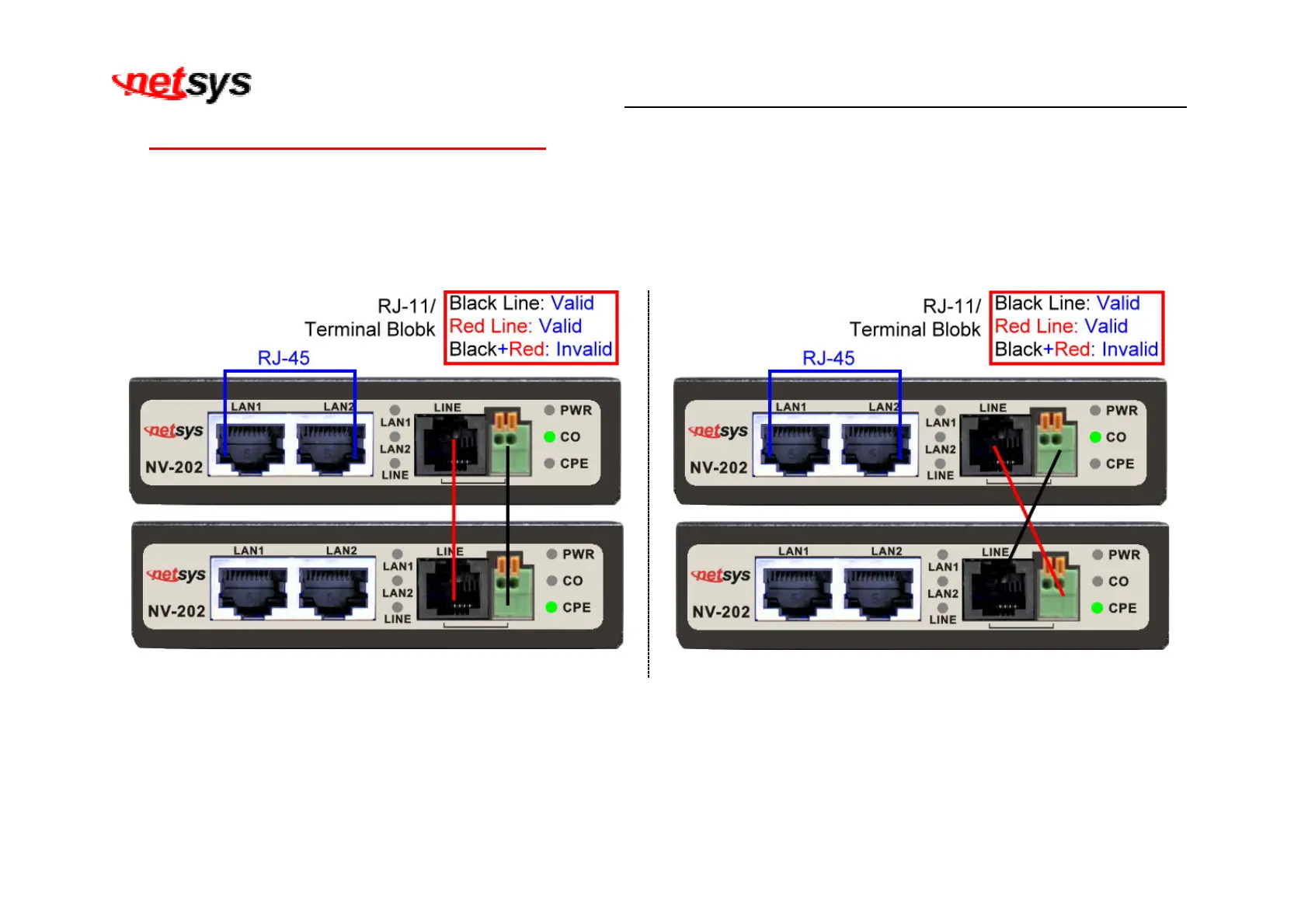
The line port has 2 connectors: RJ-45 and terminal block. It is used to connect with NV-202(CO) using a single pair phone cable
to NV-202(CPE) bridge side (point to point solution). Take note that NV-202 line port RJ-11 and terminal block cannot be used at
the same time. Either RJ-11 port is connected or terminal block is connected using straight connection (Figure 2.4) or cross-over
connection (Figure 2.5)
Figure 2.4 NV-202 line ports straight connection
Figure 2.5 NV-202 line ports crossover connection
When inserting a RJ-11 plug, make sure the tab on the plug clicks into position to ensure that it is properly seated.
Do not plug a RJ-11 phone jack connector into the Ethernet port (RJ-45 port). This may damage the bridge. Instead, use only
twisted-pair cables with RJ-45 connectors that conform to Ethernet standard.


 To Next Page