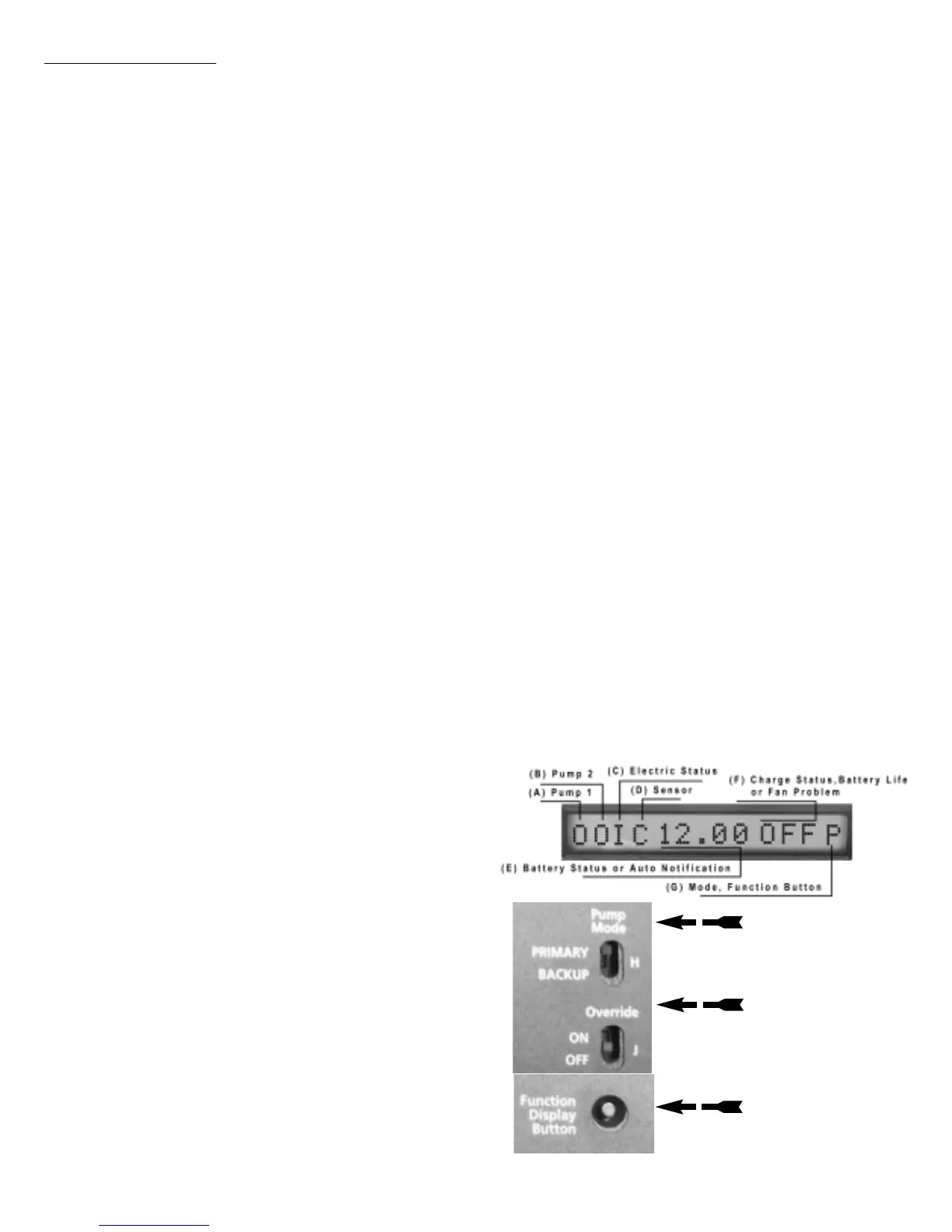
NexPump Code Chart
A - Pump 1, B - Pump 2 - (Page 9)
‘O’ Pump is Off
‘I’ Pump is On
‘A’ or ‘a’ Pump was activated – Backup mode only
‘F’ or ‘f’ Pump Problem
‘P’ or ‘p’ Possible Plumbing Clog error
‘V’ or ‘v’ Possible Vapor Lock
‘X or x’ Suspected Clog Error
‘Y or y’ Suspected Vapor Lock
‘R’ or ‘r’ Pump has over 2500 hours
C - AC Input - (Page 14)
‘O’ Input power is off,
‘I’ Input power is on
D - Sensors - (Page 14)
‘C’ - Sensors are connected & operating normally
‘1’ - Sensor1 is disconnected
‘2’ - Sensor2 is disconnected
‘H’ - Sensor2 is activated (High Water Alert)
‘D’ - Both Sensors are disconnected
E- Battery Status - (Page 7)
‘XX.XX’ Battery voltage in Volts
Normal Voltage Readings ‘12.40-13.20’
‘Disc’ Battery disconnected
Displays when Battery is disconnected or
Battery voltage is below 1.5 volts
‘Rep_’ Check or Replace Battery
E - Auto Notification - (Page 7, 15)
"BUSY" - Notification System Lines Busy
"INUSE" - Phone line is In Use
"DIAL" - Dialing Notification System
"CONND" - Connected to Notification System
"INFOS" - Error Information sent
"NLINE" - No Phone Line Connected
"ANMOD" - Internal Notification System Problem
E - Phone Monitor - (Page 12)
"PHMON" - Phone line not detected in Auto Test
E - Alarm Disabled - (Page 12)
"ALDIS" - Alarm is disabled (Resets in 5 days)
F - Charge Status - (Page 11)
Off’ Charge is off, battery is fully charged
‘Fxx’ Indicates the Full charge mode
‘Txx’ Indicates the Trickle charge mode.
‘Mxx’ Indicates the Maintain Mode
‘Dis’ Charge is disabled.
‘ttS’ The count in seconds when the charge
system will start. This allows time for the battery to be recon-
nected before the charge starts again.
‘Fl_’ Charge system failed, ‘_’ indicates the error code
F - Battery Life - (Page 8)
The number displayed is the approximate time remaining
until the battery is discharged enough that the pumps will no
longer function normally.
F - Fan Problem - (Page 14)
‘Fan’ - Indicates a Case Fan Problem.
G - Mode - (Page 6)
‘P’ - Primary Mode
‘B’ - Backup Mode
‘M’ - Manual Mode
‘E’ - Emergency Mode
G - Function Button - (Page 12)
‘C’ – Clears alarms
‘S’ or ‘U’– Silence or UnSilence Alarm (Resets in 24 Hours)
‘T’ - Run manual self test
‘N’ – Displays Serial Number
‘A’ – Displays Firmware Revision and Option Code
‘M’ - Phone Monitor
‘R’ - Battery Reset
‘I’ - Stats Info
‘D’ or ‘E’- Disable or Enable Alarm (Resets in 5 days)
H - Pump Mode - (Page 6)
Primary - Switch in UP position
Mode on LCD blinking ‘P’
Backup - Switch in DOWN position
Mode on LCD blinking ‘B’
J - Override - (Page 6, 18)
On - Switch in UP position
Both Pumps On
Off - Switch in DOWN position
Both Pumps Off and in Normal operating mode
NexPump Display Legend
19
(H)
(J)
(G)



 To Next Page