PUMP
OPERATIONS:
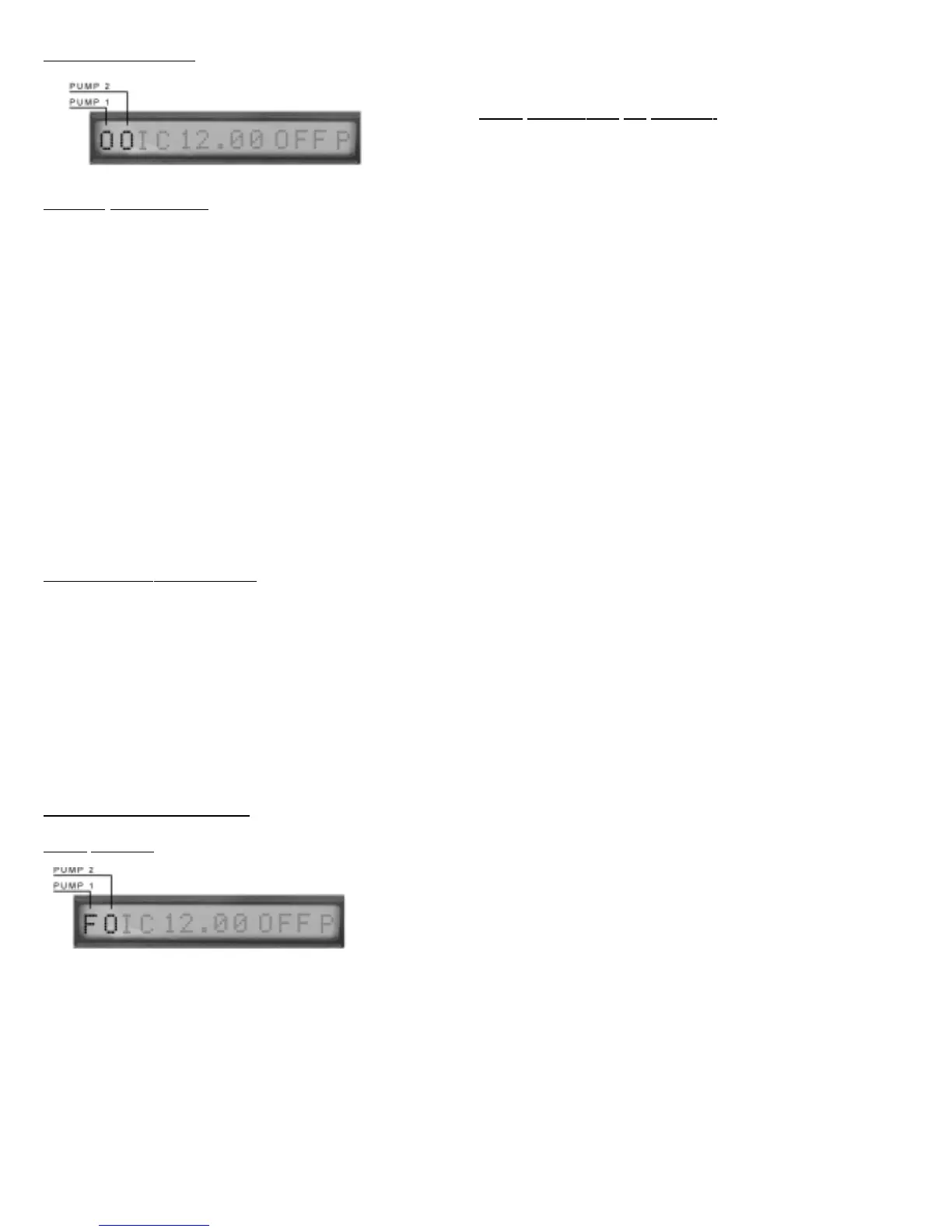
DISPLAY IDENTIFIERS:
Pump 1 – First display digit
Pump 2 – Second display digit
Identifiers;
‘O’ Pump is off
‘I’ Pump is on
‘A’ or ‘a’ Pump was activated – Backup mode
only Note: If identifier is blinking, alarm is in the silence
mode. To clear see Function button.
‘F’ or ‘f’ Pump Problem
‘P’ or ‘p’ Possible Plumbing Clog error
‘V’ or ‘v’ Possible Vapor Lock
‘X or x’ Suspected Clog Error
‘Y or y’ Suspected Vapor Lock
‘R’ or ‘r’ Pump has over 2500 hours
‘Q’ Pump Driver Problem
To clear any error - See Function Button
PUMP
DISPLAY
IDENTIFIERS:
Each pump has a corresponding letter indicting the status of
the pump. The lower case counterpart simply means the
pump is currently in use. When the identifier is a ‘F’ or ‘f’ the
NexPump has failed the indicated pump. However, if both
pumps are considered failed the NexPump will attempt to
operate the pumps within the Emergency Mode.
Auto Notification Module Installed:
Notification will occur on any pump problems.
PUMP
TROUBLESHOOTING:
PUMP FAILURE:
Pump failures will sound an alarm and be indicated by the let-
ter ‘F’ or ‘f’ in the corresponding location on the display. Other
indictors can be ‘P’ or ‘p’ for a plumbing problem or ‘V’ or ‘v’
for a vapor lock problem. If both pumps are in the disconnect-
ed mode, the NexPump unit will enter the emergency mode
to cycle the pumps every two minutes if Sensor1 is becomes
active. Pump errors must be cleared by the function button.
Plumbing and Vapor lock errors are cleared automatically. Clear
the failed condition by depressing and holding the function
button for 1 second, while the ‘C’ is in the last location of the
display release the function button. The display will show
‘Alarm Cleared’ and the identifiers will return to normal.
PUMP
INDICATORS ON DISPLAY:
‘F’ or ‘f’ - Pump failure, followed by a corresponding ‘H’ or ‘L’ to indi-
cate the failure type. If ‘H’ is indicated the pump is drawing too much
current. If ‘L’ is indicated the pump is drawing to little current.
Troubleshooting ‘H’ :
Clear alarm and run self-test, if pump again shows failure with ‘H’
then pump is faulty
Troubleshooting ‘L’ :
Clear alarm and run self-test, if pump shows failure with ‘L’, check
fuse condition for corresponding pump, check that connector is prop-
erly seated.
Important: Be very suspect if a pump shows failed. If subse-
quent tests reveal the same condition, the pump is faulty and
SHOULD NOT be used. You can disconnect it from the
NexPump Unit and disable the alarm until you can install a
replacement pump. Do not use any other pump except an OEM
pump from NexPump.
‘P’ or ‘p’ - Pump disconnected with plumbing clog. This error
indicates a possible clog in the plumbing discharge. Verify
the discharge is clear of obstructions. In the winter it may
indicate a frozen discharge pipe. Error will clear automatically
when sensor becomes inactive.
‘V’ or ‘v’ - Pump disconnected with vapor lock. This error indi-
cates there may be air trapped in the discharge plumbing. It
may also indicate the sensor is stuck in the up position. If a
check valve is used, check for a proper vent hole in the pump
discharge pipe or check if the vent hole is clogged. Error will
clear automatically when sensor becomes inactive.
‘R’ or ‘r’ - Pump has reached it’s operational life-span. The
pump may still be operational however has reached the aver-
age life span. The pump should be replaced as soon as pos-
sible. Contact NexPump for a replacement pump.
Note: Note which pump has the replace flag before clear-
ing the alarm.
‘X’ or ‘x’ - ‘Suspect Mode’. When a clog condition is first
detected the NexPump unit will display an ‘X’ in the corre-
sponding pump location. This is just a precautionary mode to
alert of a possible problem. The lower case ‘x’ indicates the
pump is running.
‘Y’ or ‘y’ - ‘Suspect Mode’. When a vapor lock condition is
first detected the NexPump unit will display a ‘Y’ in the corre-
sponding pump location. This is just a precautionary mode to
alert of a possible problem. The lower case ‘y’ indicates
the pump is running.
‘Q’ - There may be an electronic circuitry problem. Call
Support.
9


 To Next Page
 Loading...