CAMERA - PARTS & CONTROLS (CONTD.)
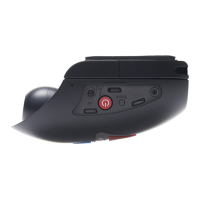
Back:
4. Power On / Off button
Press and hold for 3 seconds to turn on / off the iN-CAR CAM.
5. Up / Microphone Off button
Up:
Press to navigate up within menus and to move to the previous file when in playback mode.
Microphone Off:
Press to turn off / on the microphone (audio recording), only available whilst in video mode.
6. Down / Screen Off button
Down:
Press to navigate down within menus and to move to the next file when in playback mode.
Screen Off:
Press to turn off / on the screen, only available whilst in video mode.
7. Protect File / WiFi button
Protect File:
Press whilst recording to protect the current file in event of an emergency situation.
WiFi:
Press and hold for three seconds to turn on WiFi mode, this is not available whilst recording
or during playback.
Note:
- To exit WiFi mode please press the OK button once paired device has been disconnected.
4
8
10
12
11
7
5
9
6
10



 To Next Page