NEXTBASE REPLAY SOFTWARE FOR MAC (CONTD.)
Features & Controls
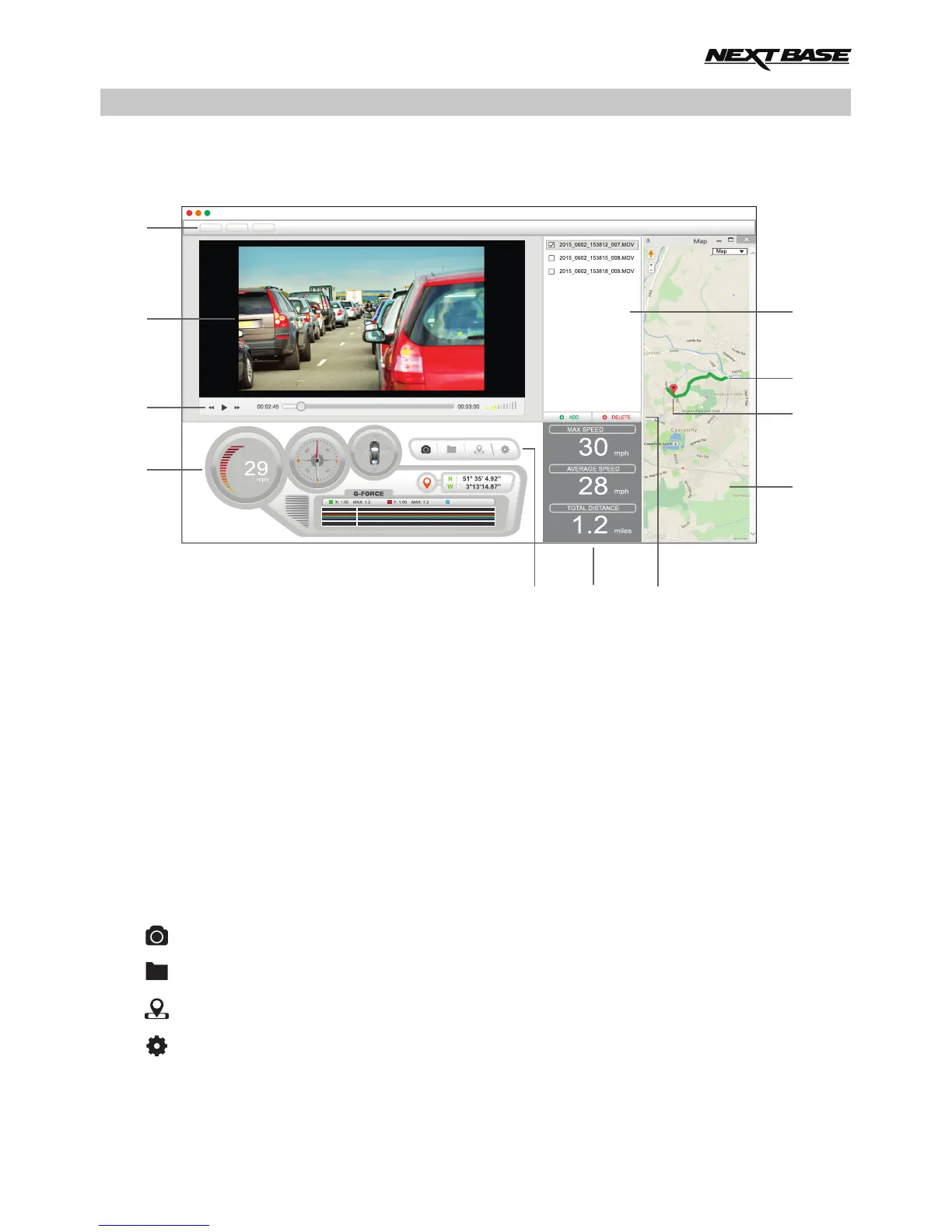
The key below explains the various information displayed within the NEXTBASE Replay software
when using a Mac platform.
1. Settings
Open: Browse for files, change settings for units of speed and language.
Map: Open and close the map window.
About: NEXTBASE Replay information.
2. Playback window
3. Playback controls
Control the playback of recordings: rewind (step backward 10 seconds), play & pause,
forward (step forward 10 seconds) and adjust the volume.
4. Journey information
Various information for the current recording is available here, such as: speed , direction of travel,
G Sensor data and co-ordinates.
5. NEXTBASE Replay controls
Screen capture, this will create a still image from the playback window.
Open screen capture folder.
Open / Close the Map window.
Open the NEXTBASE Replay settings window, to adjust language and speed units.
.
37
3
2
6
1
02/06/2015 15:35:44 NBDVR512G 29MPH N 51 35 4.92 W 3 13 14.87
4
10
9
8
5
11
7
NEXTBASE Replay
Map
AboutOpen
Z: 1.05 MAX: 1.2


 To Next Page
 Loading...