1
19
18
17
16
15
14
13
12 1110 9 8 7 6 5 4
3 2
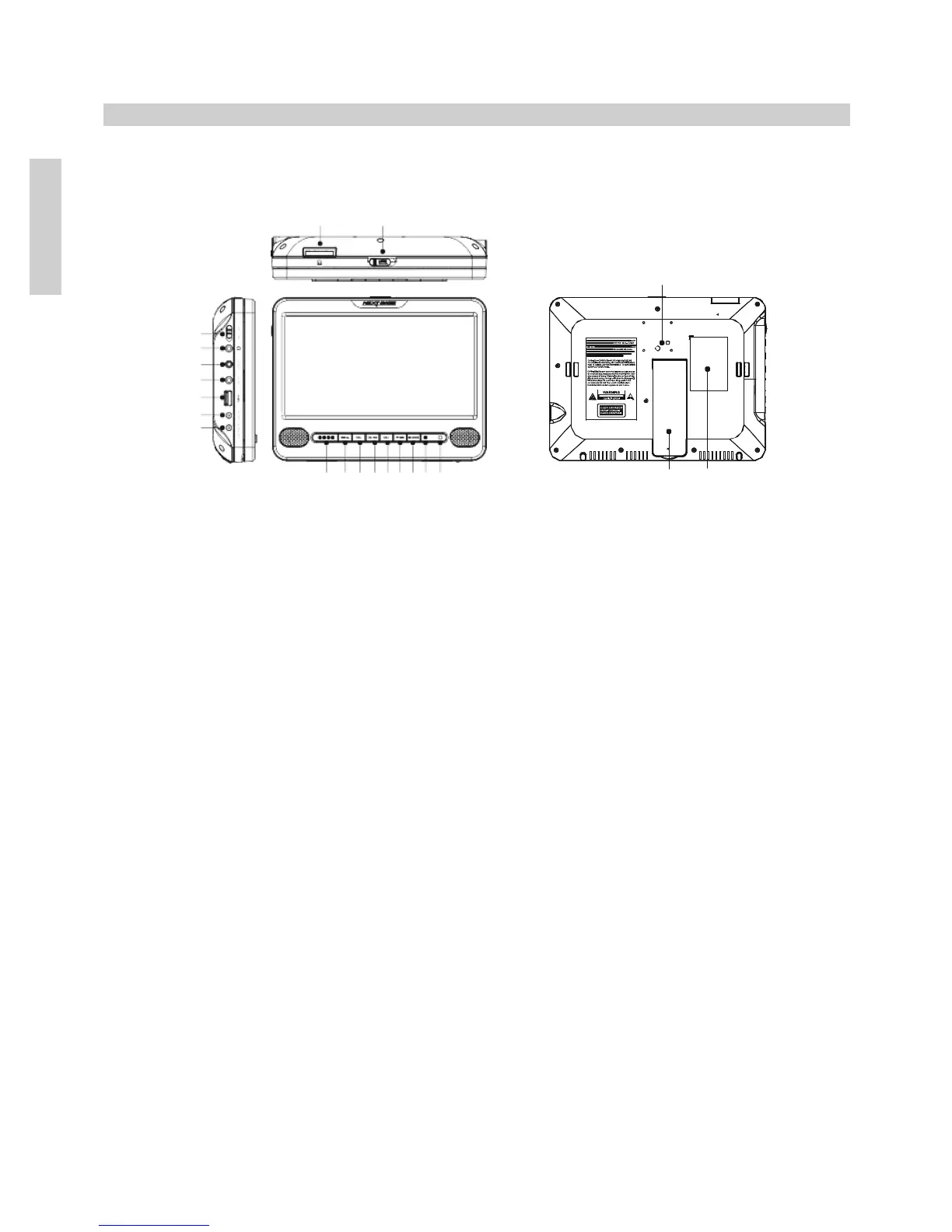
1. Fixing points for easy fit car mount bracket
Fixing points to secure the supplied car mount bracket.
See page 15 for further information.
2. Product Rating label
Product details, model name etc to be found here.
3. Player stand
Pull out stand from the bottom to use DVD player outside of vehicle.
Player stand will not be accessible when the car mount bracket is attached.
4. Receiver for remote control
Point remote control here, be careful when using two players in the same vehicle
to avoid controlling the second DVD player.
5. Power LED indicator
LED will be illuminated (red) when power is supplied to DVD player.
6. Stop / Mode
Press to stop playback.
Press and hold for 2-3 seconds to select Mode: DVD / AV IN / MEDIA / SETUP.
Note: SETUP will only give access to the General Setup Page.
7. Down / Next
Press to navigate down within the menus.
Press to move to next chapter or track.
8. VOL+
Press to increase volume level.
Applies to DVD player speakers and earphones.


 To Next Page