1
19
18
17
16
15
14
13
12 1110 9 8 7 6 5 4
3 2
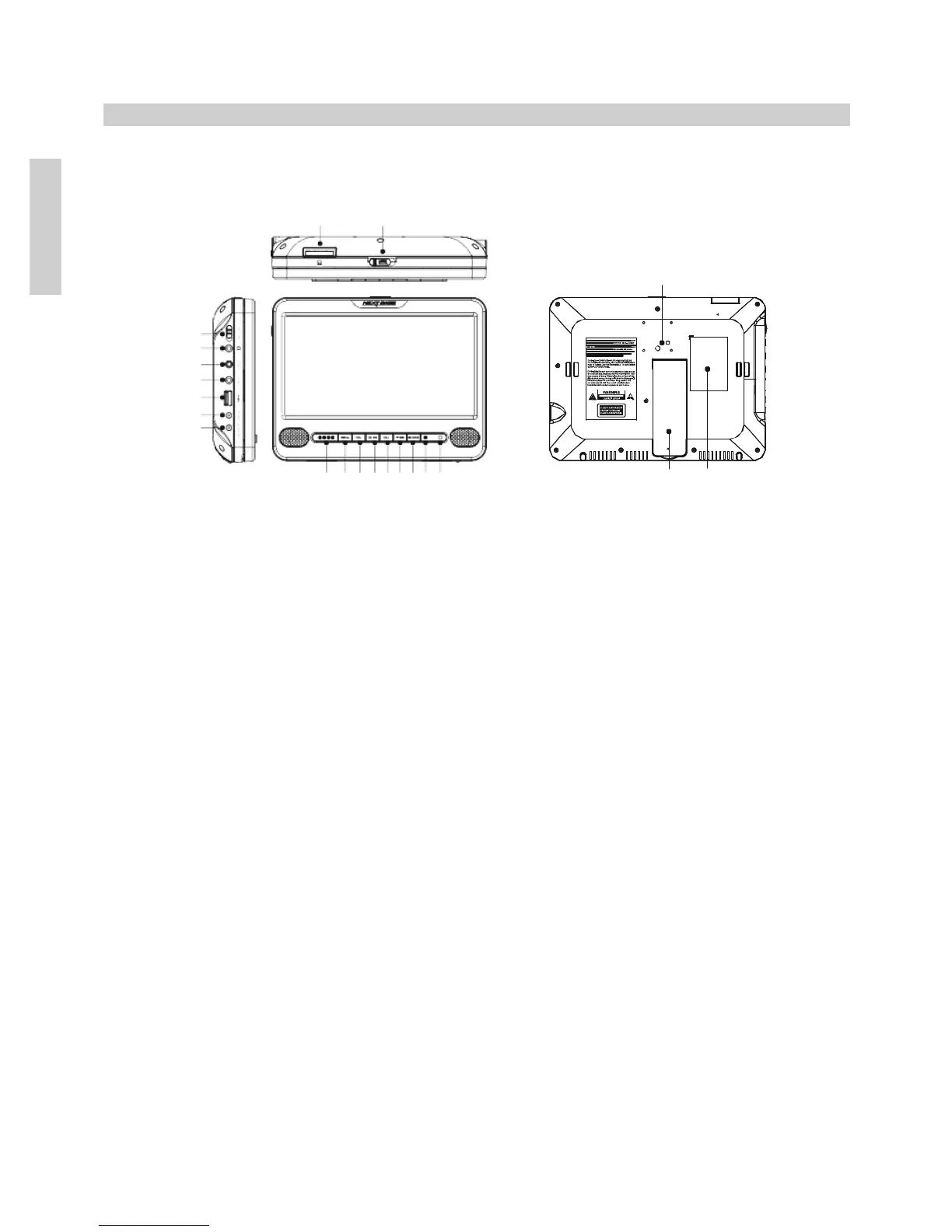
16. AV In socket
Used to connect the DVD player to a second DVD player using the connection cable
supplied with the ‘D’ (player/player) models.
The DVD player can also be connected to other devices, such as a camcorder and
used as a monitor using an AV cable (not supplied).
See page 20 for further information.
17. AV Out socket
Used to connect the DVD player to the second DVD player or monitor using the
connection cable supplied with the ‘T’ (player/monitor) and ‘D’ (player/player)
models.
The DVD player can also be connected to other external devices, such as a television
using an AV cable (not supplied).
See pages 17, 18 & 20 for further information.
18. Earphone socket
Connect earphones here, note that connecting earphones will mute the speakers.
19. On / Off switch
Move button up to turn on the DVD player ON and down to turn OFF.
20. Card Reader
Insert SD / MMC memory cards, take care that the memory card is correctly installed
with contacts facing forwards, as per the symbol.
See page 25 for further information.
21. Open
Slide button to the right to release the catch and gently pull screen forwards, to access
the disc compartment.
Note: Do not pull on the screen excessively or damage will result which is not covered
by the manufacturers warranty.


 To Next Page