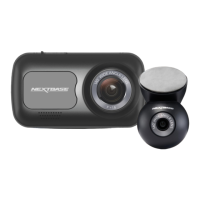
Dash Cam
Also known as a dashboard camera, a Dash Cam is a video recording device
mounted on the windshield of a vehicle to capture video footage. Piqo includes a
front facing camera.
Mount
The mount is the part that adheres directly to the windscreen (or rear window for
a rear camera). The mount attaches to the camera body. The Piqo can be
removed from the mount by sliding the Piqo away from the mount.
Loop Recording
The Dash Cam records continuously by overwriting older footage when the
storage capacity is full. Loop recording ensures that the camera always has the
latest footage available.
Emergency SOS
When Emergency SOS is set up, in the event of an incident that leaves you unable
to call for help, Emergency SOS will contact emergency services to your location
to assess the situation and assist where necessary. Emergency SOS can be set up
using the app.
microSD Card
Piqo uses a microSD card for storage. The card's capacity determines how much
footage can be stored before looping begins. It's important to use Nextbase-
branded, high-quality, high-capacity cards that are compatible with your Piqo. It
is important that this SD card is not removed during recording, or forced into the
slot, as this could damage the SD card or the SD card reader in the Piqo.
Resolution
Refers to the clarity and sharpness of the video footage recorded by your Dash
Cam. The higher the resolution, the more detail in the video, and the larger the file
size.
Field of View
Also known as a dashboard camera, a Dash Cam is a video recording device
mounted on the windshield of a vehicle to capture video footage. Piqo includes a
front facing camera.
G-Sensor
A built-in sensor that detects sudden changes in motion or impact. If Parking
Mode is turned on, an event will be recorded if the G-Sensor levels pass a
predetermined threshold. G-Sensor data is also recorded along with video feeds.
LED
Light Emitting Diode; Piqo has LEDs to signify different functions and processes by
displaying various colours through the light ring.
Event Recording
Your Piqo has built-in G-sensors which detect sudden movements or impacts.
When an event like a collision or sudden braking is detected, Piqo will
automatically save the footage surrounding the event and mark it as an
important file to be reviewed.
Pro Install Cable
A Pro Install Cable allows you to connect Piqo directly to your vehicle’s fusebox
allowing you to free up the 12V socket in your vehicle. Connecting to your vehicle’s
permanent live and enabling parking mode allows Piqo to record footage even
when the car is off. An installation guide is included with the Pro Install Cable,
once purchased.
Nextbase App
Download the latest Nextbase App for more features. When connected, you can
instantly view the videos on your Dash Cam through the app, as well as edit and
share clips.
Live View
Live View is an app feature which allows you to view the camera feed in real time,
handy when setting up the Dash Cam, to make sure the view is clear.
Glossary
22



 To Next Page