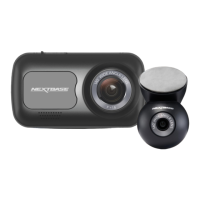
How a Dash Cam works
Overview
Camera
Your Piqo has a front facing camera to keep an eye on the road ahead.
Power Source
When connected to your vehicle using the 12V car adaptor, Pro Install Cable*
or Piqo Quick Connect Cable*, your Piqo automatically turns on and starts
recording when the engine starts.
Recording
The camera continuously records video footage while you're driving. Video is
recorded in short segments, one minute long, to make it easier to manage
the files.
Storage
Recorded video footage is stored on an SD card inserted into your Piqo. The
SD card acts as storage, similar to an SD card in a digital camera.
Nextbase App
The all-new Nextbase App ensures a seamless connection to access, edit
and share footage easily. Cutting edge features such as Emergency SOS are
included to give you the best Dash Cam experience. Search for ‘Nextbase
App’ in the app store.
Loop Recording
As the memory card fills up with recorded video, your Piqo uses a feature
called "loop recording" to overwrite the oldest footage with new recordings.
This ensures that the camera can keep recording even when the memory
card is full. Important files should be downloaded from the Dash Cam using
the Nextbase App.
Event Recording
Your Piqo has a built in G-Sensor+ which detects sudden movement or
impacts to your vehicle. When an event like a collision or sudden braking is
detected, your Piqo will automatically protect the footage surrounding the
event and mark it as a protected file to be reviewed.
Playback and Accessing Footage
To view the recorded footage, use the Nextbase App (recommended) or use
a USB-C data cable* to connect your Piqo to your computer. Alternatively,
you can use the SD card with a card reader on your computer. Once the
footage is accessed, you can review, edit, or share the recordings as
needed.
06
*sold separately



 To Next Page