24
Maintenance Tips
Product Specs
Keep your firmware up to date, check in the Nextbase
app for updates.
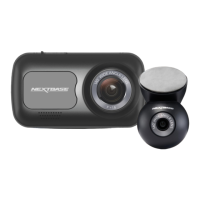
Do not spray liquids on or near your Nextbase Piqo Dash
Cam.
For easy removal from your windscreen, slide your Nextbase
Piqo Dash Cam off the mount by pulling the Dash Cam
towards you.
Use the cable tidy on the mount to help guide the cable to
your vehicle lining.
Keep the area on the windscreen directly in front of your
Dash Cam lens clear and free of dirt.
Still Have some questions?
More Piqo Info
Click here for more useful information, FAQs and videos
Resolution:
Operating system requirements:
Phone connection technology:
GPS:
Channels:
Sensor make and model:
Field of view:
Storage:
Dimensions:
Piqo 1K – 2560 x 1080p
Piqo 2K – 2560 x 1440p
iOS 15 and Android 8
Wi-Fi 2.4Ghz and Bluetooth 4.1
10Hz
1 Channel
Omnivision
Piqo 1K – 140°
Piqo 2K – 145°
Piqo 1K – 128GB (12 hours of footage)
Piqo 2K – 256GB (18 hours of footage)
109 x 40 x 32mm



 To Next Page