10
nextel.com
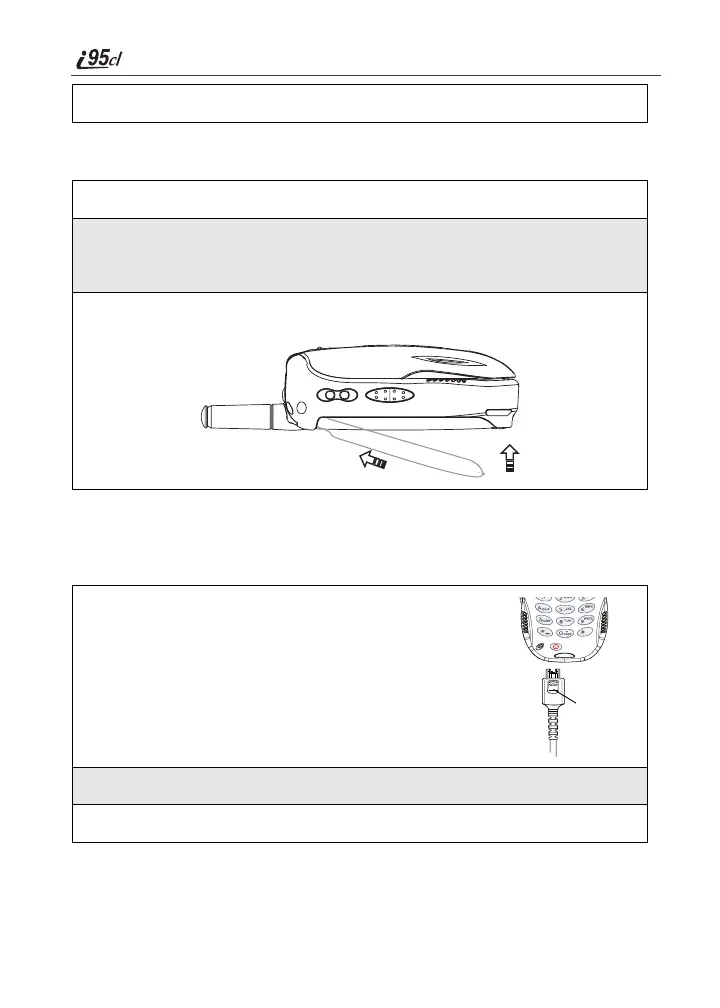
Detaching the Battery
Charging the Battery
NOTE: The battery can be charged with the phone turned either on or off. For best
results, charge it with the phone turned off.
3
Replace the battery cover and press it gently until you hear a click.
1
Ensure the phone is powered off before attempting to detach the battery.
2
Slide the battery cover release button, located on the bottom of the
phone, away from the battery cover and remove the battery cover from
the back of the phone.
3
Remove the battery by pushing the battery toward the antenna and
lifting it out of the phone.
1
With your phone’s display screen facing up, plug the
charger’s connector into the left side of the accessory
connector on the bottom of the phone.
NOTE: To reduce damage to the phone’s bottom connector,
the charger accessory button should always be used.
2
If the charger has folding electrical prongs, flip open the prongs.
3
Plug the charger into an electrical outlet.
Charger
accessory
button



 To Next Page