9
Battery
The icon of the main menu feature in use, displays in the top row, on the left of
the icon rows. For a list of the main menu options, see “Main Menu Options” on
page 34.
Battery
Your i95cl phone comes with a Lithium Ion battery and charger. After attaching
the battery, you must charge it before you use it for the first time. See
“Batteries” on page 159 for the charging time for your phone’s battery. The first
time you charge your phone’s battery, charge it for 30 minutes more than the
time shown on page 159. After the initial charging, the battery can be charged in
the time shown on page 159.
Remove the battery from the protective plastic safety tray provided in the
original packaging. When the battery is not attached to the phone, store it in the
original tray.
NOTE: Use only the batteries approved for this product.
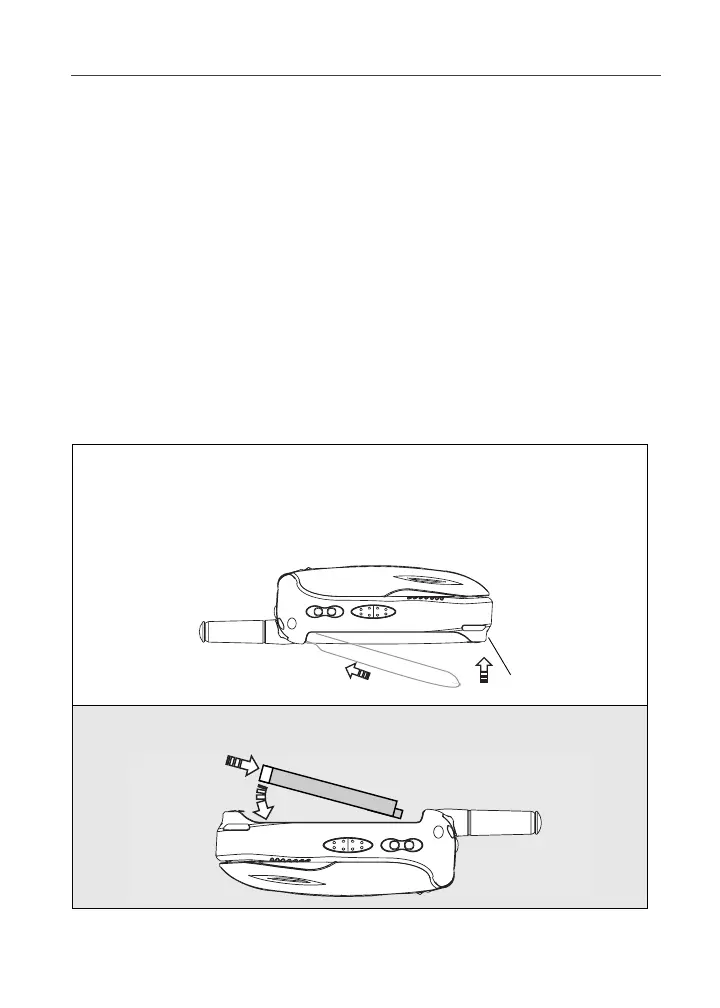
Attaching the Battery
1
Slide the battery cover release button, located on the bottom of the
phone, away from the battery cover and remove the battery cover from
the back of the phone.
USER TIP: Holding the battery cover downward allows it to fall easily from the
back of the phone without being pulled.
2
Insert the top of the battery into the battery compartment. Press the
bottom of the battery to secure it.
Battery cover
release button



 To Next Page