30
nextel.com
The idle screen displays any time the phone is powered on but not engaged in
some activity. You must start at the idle screen to access many of your phone’s
features and functions. You can always access the idle screen by pressing r.
USER TIP: When your phone cover is open, closing the phone cover and re-opening
the phone cover accesses the idle screen.
Status Icons
Status icons appear in the two rows at the top of the full-sized color display
screen. Some appear at all times; others, appear only when your phone is
engaged in certain activities or when you have activated certain features.
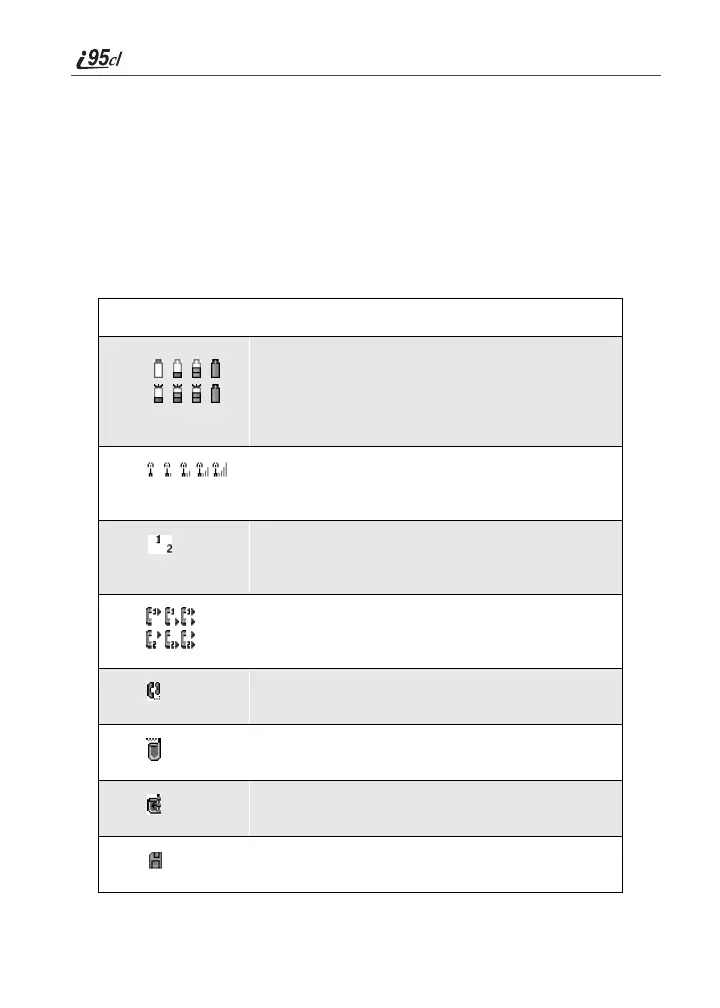
Icon Indicates...
Battery Strength icons — remaining
battery charge. More bars on the battery
indicate a greater charge. See “Battery
Charging Status” on page 11 for detailed
information about battery strength icons.
Signal Strength icons — strength of the
network signal. More bars next to the
antenna indicate a stronger signal.
Active Line icons — currently active
phone line; 0 indicates Line 1 is active; 1
indicates Line 2 is active.
Call Forward icons — phone is set to
forward calls. See “Call Forwarding” on
page 67 for more information.
Phone In Use — phone is connected on an
active call.
Private In Use — number being called is a
Private ID.
Talkgroup In Use — phone is active on a
group call.
Packet Data Ready — phone is ready to
receive data through a data cable.



 To Next Page