29
Display Screens
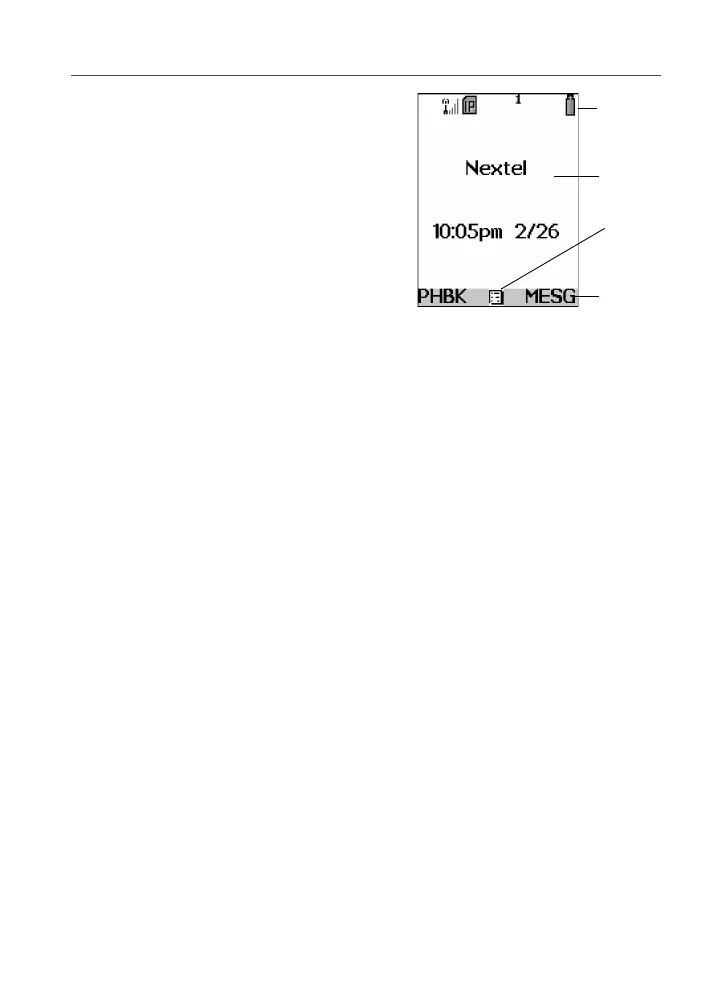
Full-Sized Color Display Screen
The full-sized color display screen consists
of:
• status icon rows–the top two rows display
status. See “Status Icons” on page 30.
• text display area–displays up to seven
lines of text and icons. See “Text Display
Area” on page 32.
• menu icon–see “Menu Icon” on page 33.
• display options–see “Display Options” on
page 33.
One-Line Display Screen
The one-line display screen shows limited text and
one icon on each side of the text. The icons are
presented in black and are simple versions of the
icons that appear on the full-sized display.
The text shown is a shortened version of information included on the full-sized
screen. To see more complete information, open the phone cover.
The icon area on the left may display:
• signal strength icon–see “Status Icons” on page 30.
• call information icon–see “Call Information Icons” on page 32.
• recent call icon–see “Recent Calls Icons” on page 58.
• missed call icon–see “Missed Calls” on page 60.
• message icon–see “Messaging Services” on page 89.
The icon area on the right may display:
• battery strength icon–see “Status Icons” on page 30.
• Phonebook type icon for your current call or most recent call–see
“Phonebook Icons” on page 37.
The Idle Screen
The illustration of the full-sized color display above shows the idle screen. The
idle screen displays NEXTEL, the time and date, and any active styles (see
“Styles” on page 151). The illustration of the one-line display above shows the
one-line equivalent of the idle screen.
Status
icon
rows
Text
display
area
Menu
icon
Display
options
1



 To Next Page