JAN 2024 Page | 10
2. Hardware Installation
Depending on the kit, ‘Fixed’ versus ‘Mobile’, refer to the appropriate section and steps below for
installation details.
2.1 Install the SIM Card (Fixed or Mobile Kits)
Note: If the SIM card has been pre-installed, skip this part.
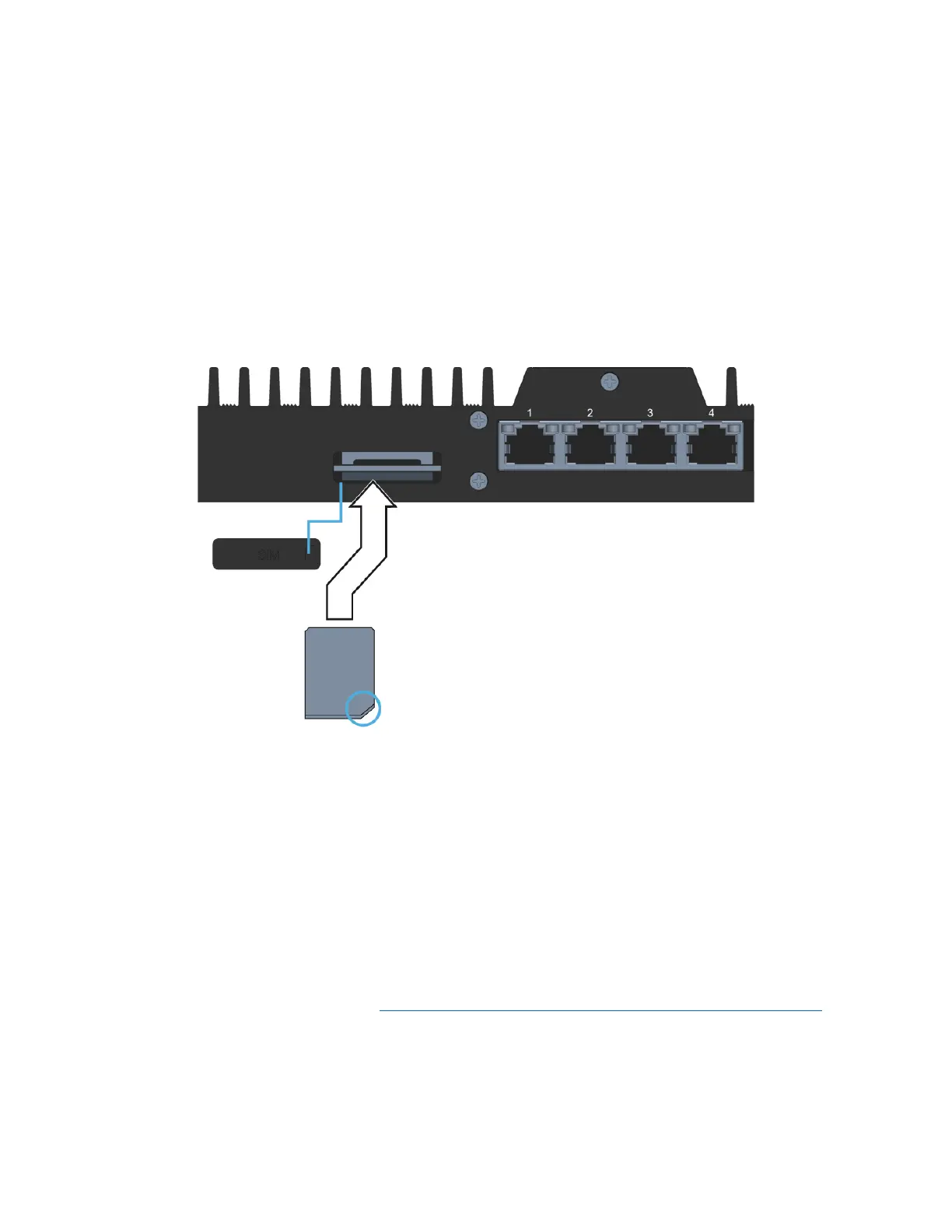
1) Remove the SIM card cover by pressing a thumbnail or flathead screwdriver in the gap between
the metal and plastic located on the left side of the unit as shown. You should now see the edge
of the silver SIM tray.
2) Remove the SIM tray with the included SIM Ejector Tool by inserting the tool into the hole on the
SIM tray; the tray should pop partway out. Remove the SIM tray completely.
3) Insert your activated SIM into the tray, insert the tray into the slot, and press the cover back into
place.
Note: The SIM tray is notched so align the card in the tray accordingly.
2.2 Fixed Kit: Fixed or Office Installation
There is an installation video located at https://go.nextivityinc.com/megafi-fixed-installation-guide that
may assist in providing an overview of the steps to a successful vehicle installation.
Below are detailed steps for installing the Fixed MegaFi kit.
Note: Only use the power cord supplied with your MegaFi.



 To Next Page