INITIAL POWER UP
• Apply mains power to the system
• This will start the panel in alarm mode and display
• Enter engineer code (7890 - default) to silence alarm
• Re-enter code to reset panel and enter engineer menu
PROGRAMMING THE SYSTEM
System menus
• Master User Menu
• Normal User Menu
• Engineer Menu
The three system menus each give a differing amount of control over the
operation of the panel.
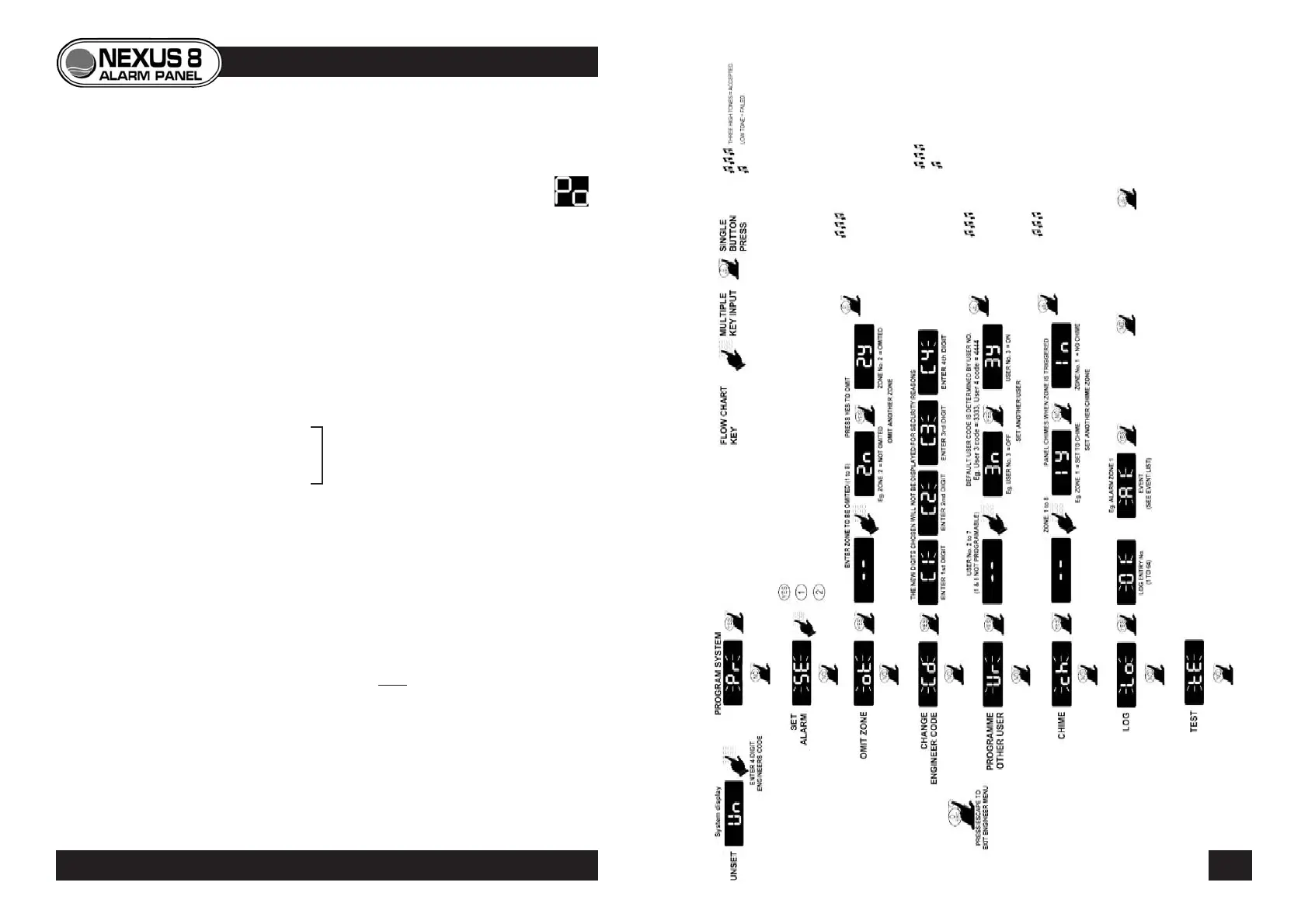
Engineer Menu (flow chart p.17)
• Accessed by entering the engineer code
(7890 - default).
• System can be unset by engineer only if set by engineer.
• Gives access to all master user functions as well as system
programming.
• System programming can only be carried out from
within the engineer menu.
ENGINEER MENU FLOW-CHART
16 17
PROGRAMMING THE PANEL
See USER GUIDE
© Lynteck Ltd. 1998 LY68-030-68



 To Next Page