4 | ni.com | NI 9234 Calibration Procedure
Test Conditions
The following setup and environmental conditions are required to ensure the NI 9234 meets
published specifications.
• Keep connections to the device as short as possible. Long cables and wires act as antennas,
picking up extra noise that can affect measurements.
• Verify that all connections to the device are secure.
• Use shielded copper wire for all cable connections to the device. Use twisted-pairs wire to
eliminate noise and thermal offsets.
• Maintain an ambient temperature of 23 ±5 °C. The device temperature will be greater than
the ambient temperature.
• Keep relative humidity below 80%.
• Allow a warm-up time of at least 10 minutes to ensure that the NI 9234 measurement
circuitry is at a stable operating temperature.
Initial Setup
Complete the following steps to set up the NI 9234.
1. Install NI-DAQmx.
2. Make sure the NI cDAQ-9178 power source is not connected.
3. Connect the NI cDAQ-9178 to the system safety ground.
a. Attach a ring lug to a 14 AWG (1.6 mm) wire.
b. Connect the ring lug to the ground terminal on the side of the NI cDAQ-9178 using
the ground screw.
c. Attach the other end of the wire to the system safety ground.
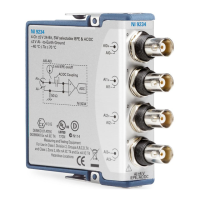
4. Install the module in slot 8 of the NI cDAQ-9178 chassis. Leave slots 1 through 7 of the
NI cDAQ-9178 chassis empty.
5. Connect the NI cDAQ-9178 chassis to your host computer.
6. Connect the power source to the NI cDAQ-9178 chassis.
7. Launch Measurement & Automation Explorer (MAX).
8. Right-click the device name and select Self-Test to ensure that the module is working
properly.


 To Next Page