EasyManua.ls Logo

NI cRIO-9053 - User Manual

Default Icon
27 pages
Print Icon
To Next Page IconTo Next Page
Loading...
GETTING STARTED GUIDE
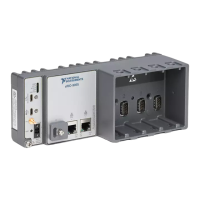
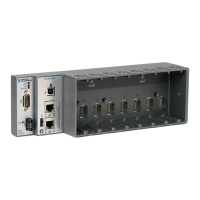
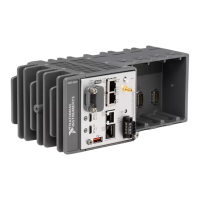
cRIO-905x
Embedded CompactRIO Controller with Real-Time Processor and
Reconfigurable FPGA
This document describes how to begin using the cRIO-905x.
In this document, the cRIO-9053, cRIO-9054, cRIO-9055, cRIO-9056, cRIO-9057, and
cRIO-9058 are referred to collectively as cRIO-905x.
Note Refer to the device Safety, Environmental, and Regulatory Information
document, shipped with your cRIO-905x controller and available on ni.com/
manuals, for important safety and environmental specifications necessary when
setting up your device.
Unpacking the Kit
Notice To prevent electrostatic discharge (ESD) from damaging the device, ground
yourself using a grounding strap or by holding a grounded object, such as your
computer chassis.
1. Touch the antistatic package to a metal part of the computer chassis.
2. Remove the device from the package and inspect the device for loose components or any
other sign of damage.
Notice Never touch the exposed pins of connectors.
Note Do not install a device if it appears damaged in any way.
3. Unpack any other items and documentation from the kit.

Question and Answer IconNeed help?

Do you have a question about the NI cRIO-9053 and is the answer not in the manual?

Summary

Host Computer Software Installation

Installing cRIO-905 x C Series Modules

Grounding the cRIO-905 x Controller

Connecting cRIO-905 x to Power

Connecting cRIO-905 x to Host Computer via USB

Discovering cRIO-905 x in Measurement & Automation Explorer (MAX)

Setting a cRIO-905 x System Password

Installing Software on the cRIO-905 x Controller

Testing cRIO-905 x Communication in MAX

Changing cRIO-905 x Module Modes in MAX

Troubleshooting cRIO-905 x Connectivity Issues

Troubleshooting Network Communication

Guides on troubleshooting network communication issues with the cRIO-905x.

Verifying cRIO-905 x System IP Configuration

Configuring Windows Firewall for cRIO-905 x

Using cRIO-905 x with LabVIEW

Creating a LabVIEW Project for cRIO-905 x

Deploying C Series Modules in LabVIEW

Creating a LabVIEW FPGA Project for cRIO-905 x

Deploying C Series Modules in LabVIEW FPGA

Summary

Host Computer Software Installation

Installing cRIO-905 x C Series Modules

Grounding the cRIO-905 x Controller

Connecting cRIO-905 x to Power

Connecting cRIO-905 x to Host Computer via USB

Discovering cRIO-905 x in Measurement & Automation Explorer (MAX)

Setting a cRIO-905 x System Password

Installing Software on the cRIO-905 x Controller

Testing cRIO-905 x Communication in MAX

Changing cRIO-905 x Module Modes in MAX

Troubleshooting cRIO-905 x Connectivity Issues

Troubleshooting Network Communication

Guides on troubleshooting network communication issues with the cRIO-905x.

Verifying cRIO-905 x System IP Configuration

Configuring Windows Firewall for cRIO-905 x

Using cRIO-905 x with LabVIEW

Creating a LabVIEW Project for cRIO-905 x

Deploying C Series Modules in LabVIEW

Creating a LabVIEW FPGA Project for cRIO-905 x

Deploying C Series Modules in LabVIEW FPGA

NI cRIO-9053 Specifications

General IconGeneral
BrandNI
ModelcRIO-9053
CategoryController
LanguageEnglish

Related product manuals