5
Motor Installation
Always disconnect electrical power at the fuse box or circuit breaker panel before handling electrical
connections or performing maintenance on this unit. Allow the motor to come to a complete stop and wait
four (4) minutes. This allows the capacitors to discharge any residual voltage for safety.
Double-check to make sure that electrical power is removed and that it cannot be turned on while you are
working on the equipment.
A poor electrical connection can overheat and cause terminal and/or terminal board failures. Examine the
wiring harness quick-connect terminals carefully for any signs of physical deterioration or loose fit to the
terminals on the motor terminal board.
Step 1: Turn OFF Electrical Power
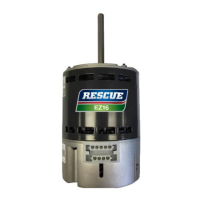
These instructions provide field technicians a guide for installing a RESCUE
®
EZ13 motor and are intended for
a typical air handler/furnace equipment system. These instructions do not override or replace instructions by
the HVAC system manufacturer.
1. Turn OFF electric power to the HVAC unit at the disconnect or the main service panel before making any
electrical connections.
Step 2: Remove the Blower Housing from the HVAC Equipment
1. Disconnect the furnace wiring harness from the motor.
2. Remove the blower housing from the air handling unit. Refer to the manufacturer’s installation manual for
blower removal instructions.



 To Next Page