EasyManua.ls Logo

Nidek Medical RT-3100 - User Manual

Nidek Medical RT-3100
142 pages
Print Icon
To Next Page IconTo Next Page
Loading...
REFRACTOR
REFRACTOR
RT-3100
RT-3100
OPERATOR’S MANUAL
OPERATOR’S MANUAL

Table of Contents

Other manuals for Nidek Medical RT-3100

Questions and Answers

  • K
    Kevin LinJul 31, 2025
    What to do if the display and presented chart disappear suddenly on my Nidek Medical Equipment?
    • L
      Luke GonzalezJul 31, 2025
      This indicates that the RT-3100 has entered power saving mode. To restore the display, simply press any key.
  • B
    byrdkevinAug 4, 2025
    What to do if none of the keys on the control box function on my Nidek Medical Equipment?
    • J
      Jennifer RodriguezAug 4, 2025
      If any abnormalities occur and none of the keys on the control box are functioning, turn the main switch of the system table off, and then turn it back on again.
  • Q
    qericksonAug 9, 2025
    What to do if the refractor does not start even though the power is turned on in Nidek Medical Equipment?
    • M
      Mrs. Alison PetersonAug 9, 2025
      First, make sure that the power cord is properly connected to a wall outlet. Also, confirm that the system table is turned on.
  • D
    David PaulAug 13, 2025
    What to do if pressing the print button does not print the result on Nidek Medical Equipment?
    • E
      Emily BerryAug 13, 2025
      Here are a few things to check: * Replace the printer paper. * Make sure that the Printer parameter is not set to No. * Confirm that the printer paper is loaded with the correct side up.
  • H
    Haley HerreraAug 17, 2025
    Why does 'Setup data is initialized' appear on my Nidek Medical Equipment?
    • K
      Kristine HallAug 17, 2025
      This message appears because the internal battery is low. Leave the power on for several hours to allow the battery to charge. Also, contact NIDEK or your authorized distributor.
  • K
    Kyle TaylorAug 22, 2025
    What to do if I receive incorrect responses from the touch-screen panel of my Nidek Medical Equipment?
    • M
      Melissa GreerAug 22, 2025
      Calibrate the touch-screen panel.
  • H
    heather50Aug 27, 2025
    Why data cannot be read even though the Eye Care card is inserted in my Nidek Medical Equipment?
    • J
      James MoodyAug 27, 2025
      Data cannot be read if: * An auto ref/keratometer has no AR measurement data. * The right or left was not specified by the lensmeter. * When any error occurs while data is written with an auto refractometer or lensmeter, clean its card reader and rewrite the data to the Eye Care card.

Summary

Safety and Usage Guidelines

Safety Precautions

Defines warning and caution signals used in the manual for safe operation.

Usage Precautions

Details critical safety steps and environmental conditions before initial device operation.

During Use

Provides instructions and warnings for safe operation of the device.

Patient Environment

Defines the patient environment and necessary precautions for device use.

After Use

Outlines procedures for safe shutdown and storage of the device.

Maintenance

Covers procedures for device upkeep, cleaning, and servicing by authorized personnel.

Disposal

Provides guidance on proper disposal of the device and its components according to regulations.

Before Use

Outline and Intended Use

Overview of the RT-3100 refractor and its intended purpose in determining refractive error.

Refractor Configuration

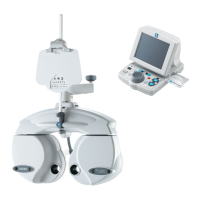
Describes the physical components and arrangement of the refractor system including head and control box.

Operating Procedures

Entering Data

Explains how to input objective (AR) and lensometry (LM) data into the system.

Standard Program Refraction

Guides through the standard Program A for full correction and prescription.

Advanced Features

Data List

How to view all measured data in a list format.

Programming Refraction Sequences

Creating and managing custom refraction programs (A, B, C).

Parameter Settings

Customizing various operational parameters and settings of the device.

Test Method

Unaided Visual Acuity Test

Steps for measuring a patient's visual acuity without corrective lenses.

Binocular Visual Function Tests

A suite of tests to evaluate the coordination and function of both eyes together.

Maintenance and Troubleshooting

Maintenance Procedures

Covers procedures for device upkeep, cleaning, and servicing by authorized personnel.

Troubleshooting

Provides solutions for common problems and errors encountered with the RT-3100.

Specifications and Accessories

Specifications

Details the technical specifications, dimensions, and power requirements of the RT-3100.

Appendix

Linkage between Charts and Auxiliary Lenses

Shows which auxiliary lenses are linked to specific charts when Chart link is enabled.

VA Conversion Table

Provides a conversion table between decimal and fractional visual acuity notations.

EMC (Electromagnetic Compatibility)

Electromagnetic Emissions and Immunity

Information on RF emissions, immunity standards, and environmental guidance.

Index

Index

Alphabetical listing of topics and their corresponding page numbers for easy reference.

Nidek Medical RT-3100 Specifications

General IconGeneral
BrandNidek Medical
ModelRT-3100
CategoryMedical Equipment
LanguageEnglish

Related product manuals