EasyManua.ls Logo

Nightfox PROWL - Display Information

Nightfox PROWL
79 pages
Print Icon
To Next Page IconTo Next Page
To Previous Page IconTo Previous Page
Loading...
English
6
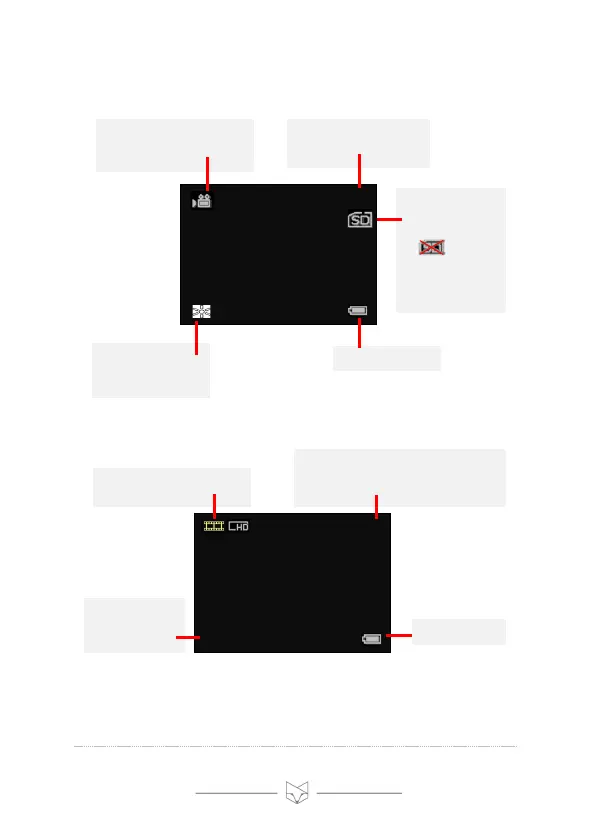
7. Display information
Video mode:
Playback mode:
Note: the display icons disappear by default. “Autohide Icons”
can be set to “off” via the settings menu (see section 12).
Micro SD card is
installed and ready
for videos.
If is
displayed, check
that the Micro SD
card is correctly
inserted
Indicates the LCD
screen brightness
(levels 1 – 5)
00:45:00
LCD Screen
.
5
Battery status
Displays the amount of
recording time remaining
(HH:MM:SS)
Shows that Video mode is
selected and the device is
ready to record
Displays the file
type of the
selected video
0006
LCD Screen
.
AVI
Battery status
Indicates the number of the selected
video (i.e. 6th in this example)
Indicates that Playback
mode is selected

Table of Contents

Related product manuals