11
Operation Instructions
• Power/Menu Button: Used to navigate the menu and select options.
• Paper Feed/Select Button: Used for selecting specific functions or adjusting settings.
Function Description
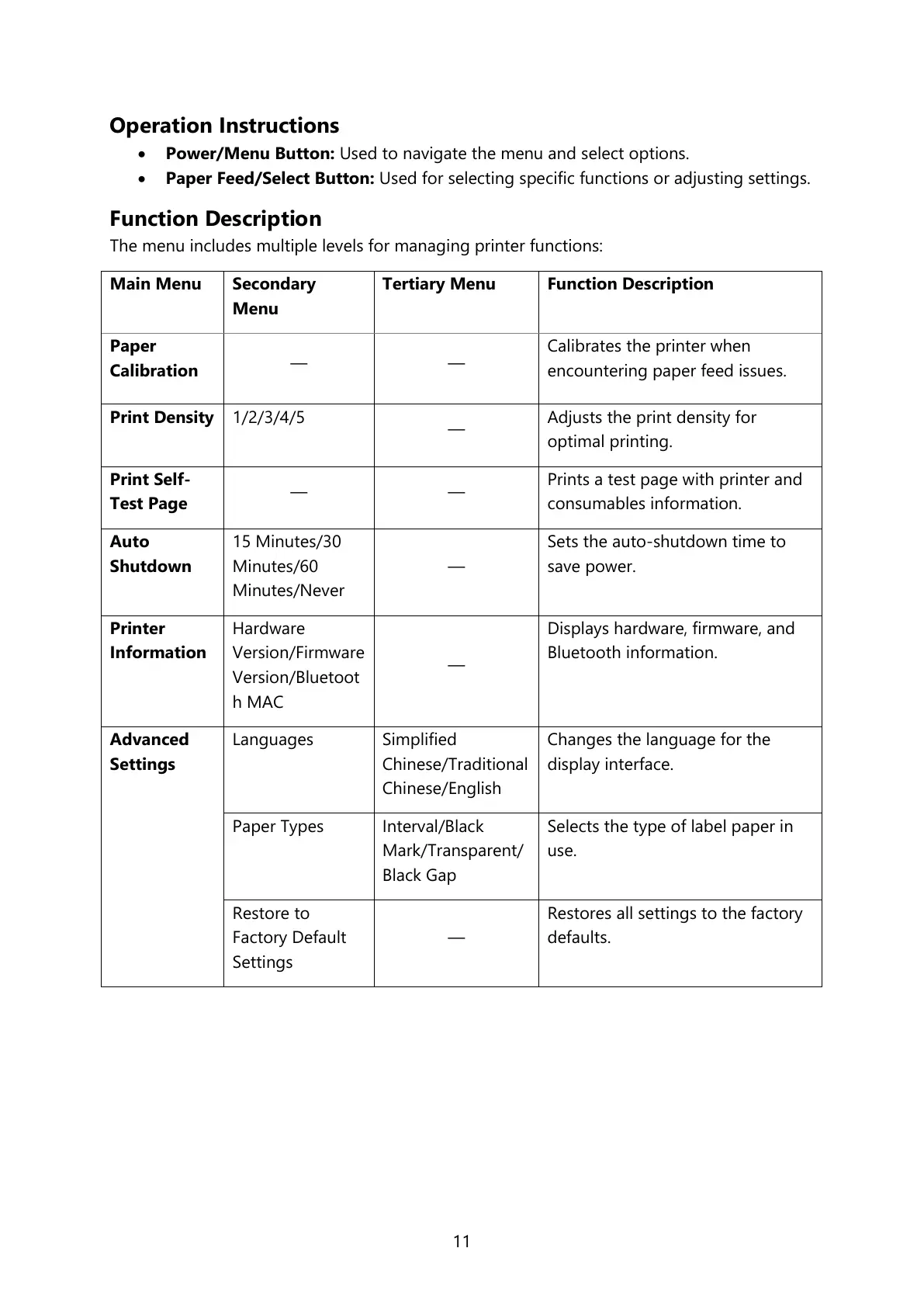
The menu includes multiple levels for managing printer functions:
Calibrates the printer when
encountering paper feed issues.
Adjusts the print density for
optimal printing.
Prints a test page with printer and
consumables information.
15 Minutes/30
Minutes/60
Minutes/Never
Sets the auto-shutdown time to
save power.
Hardware
Version/Firmware
Version/Bluetoot
h MAC
Displays hardware, firmware, and
Bluetooth information.
Simplified
Chinese/Traditional
Chinese/English
Changes the language for the
display interface.
Interval/Black
Mark/Transparent/
Black Gap
Selects the type of label paper in
use.
Restore to
Factory Default
Settings
Restores all settings to the factory
defaults.



 To Next Page