3
s
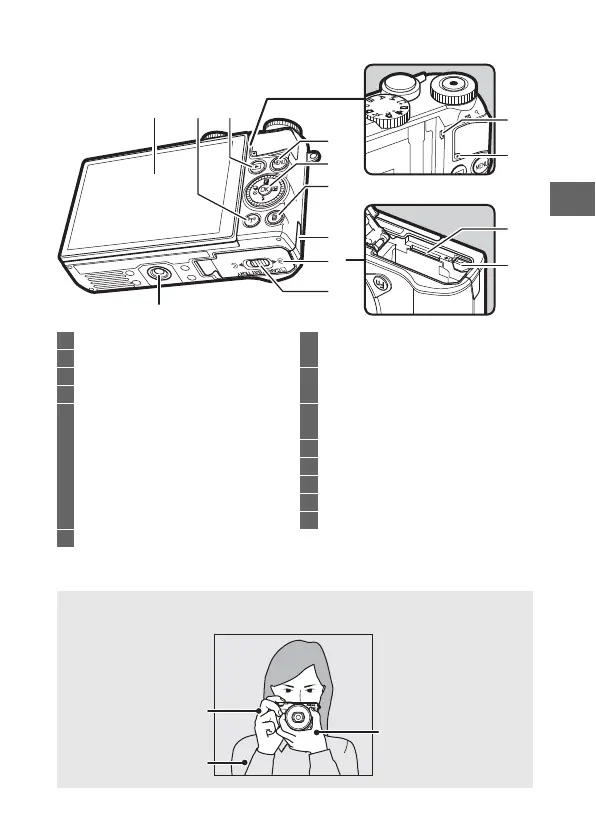
The Camera Body (Continued)
* Camera does not support TA-N100 tripod mounting spacer.
1
32
10
4
5
12
14
13
11
6
7
9
8
1 Tilting monitor .................... 4, 125, 196
2 F (Wi-Fi) button .....................118, 121
3 K (playback) button ............37, 86, 93
4 G (menu) button .......................... 9
5 Multi selector......................................... 8
J (OK) button....................................... 8
& (feature) ...........................................11
E (exposure compensation)..........101
M (flash mode)...................................102
C (continuous shooting/
self-timer)...............................74, 97, 99
6 O (delete) button.......................38, 134
7 Power connector cover
for optional power connector......204
8 Battery-chamber/
memory card slot cover... 23, 25, 204
9 Battery-chamber/memory card slot
cover latch........................... 23, 25, 204
10 Tripod socket
*
11 Speaker
12 Memory card access lamp......... 25, 35
13 Memory card slot................................ 23
14 Battery latch......................... 23, 25, 204
A
Holding the Camera
When framing photographs, hold the camera as shown below.
Hold the camera in
your right hand.
Keep your elbows
propped lightly
against your torso.
Cradle the lens with
your left hand.



 To Next Page
 Loading...








