102
Picture Editing
Editing Pictures
I D-Lighting: Enhancing Brightness and Contrast
D-Lighting can be used to create copies with enhanced brightness and contrast,
brightening dark portions of a picture. New copies are stored as separate files.
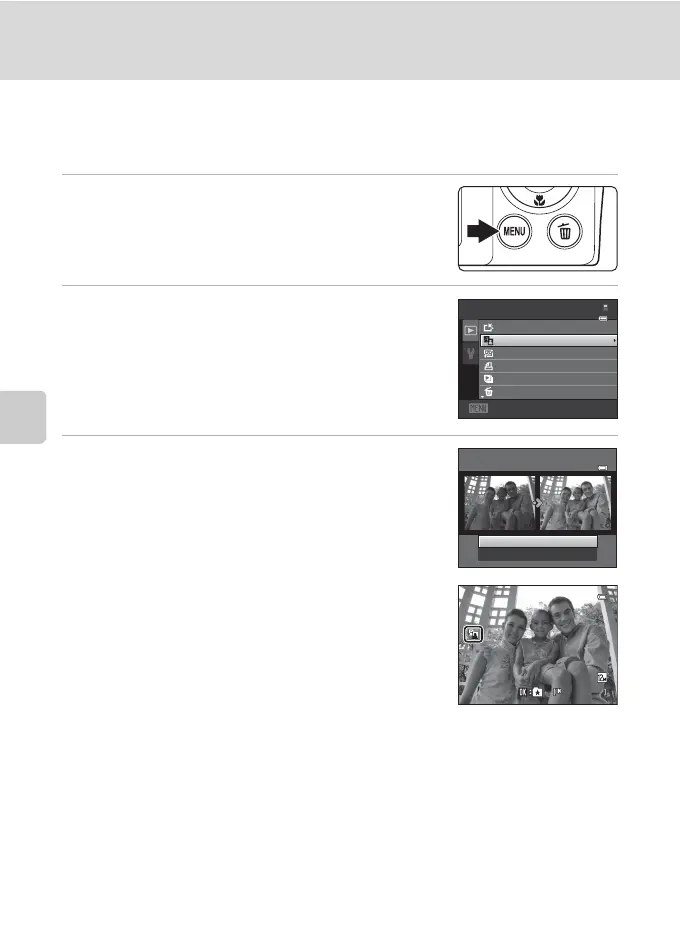
1 Select the desired picture from full-frame
(A 28) or thumbnail (A 70) playback mode
and press the d button.
The playback menu is displayed.
2 Use the multi selector to choose I D-Lighting
and press the k button.
The original version is displayed on the left and the edited
version is displayed on the right.
3 Choose OK and press the k button.
A new copy with enhanced brightness and contrast is
created.
To exit without saving the copy, choose Cancel and
press the k button.
D-Lighting copies can be recognized by the c icon
displayed during playback.
D More Information
See “Image/Sound File and Folder Names” (A 150) for more information.
Exit
Playback menu
Quick retouc h
D-Lighting
Skin softening
Delete
Prin t order
Slide show
D-Lighting
OK
Cancel
0004.J P G
4/ 4
1 5 / 0 5 / 2 0 1 1 1 5 : 3 0
1 5/05/2011 15:30



 To Next Page
 Loading...