EasyManua.ls Logo

Nikon COOLPIX S4 - Connecting the Usb Cable

Nikon COOLPIX S4
108 pages
Print Icon
To Next Page IconTo Next Page
To Previous Page IconTo Previous Page
Loading...
47
More on Playback
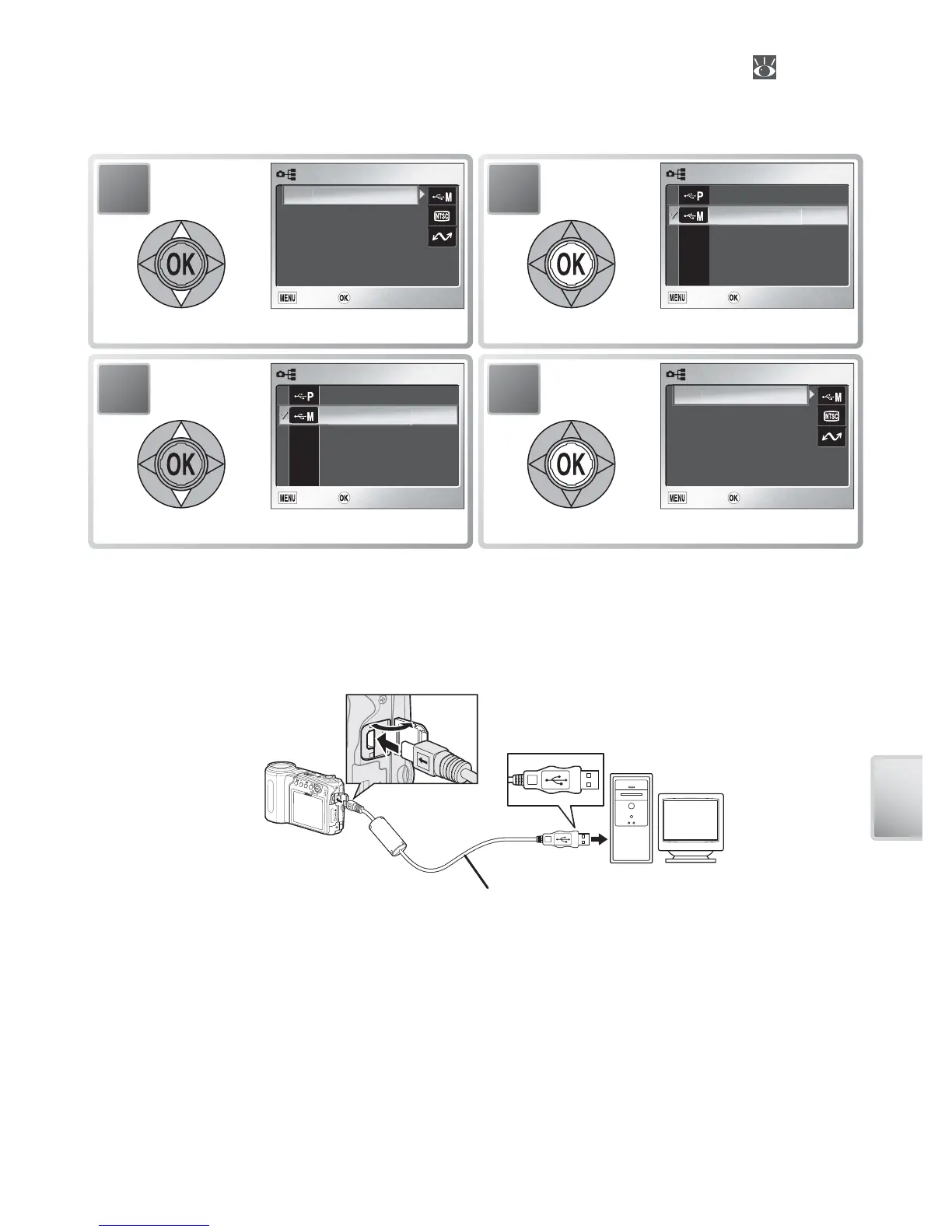
To choose a USB option, highlight Interface in the setup menu ( 79) and
press the multi selector to the right. The menu shown in Step 1 will be dis-
played.
2
USB
USB
USB
Exit
Exit
Exit Confirm
Confirm
Confirm
PTP
g
Mass stora
g
e
Display USB menu.
1
INTERFACE
INTERFACE
INTERFACE
Exit
Exit
Exit Confirm
Confirm
Confirm
Vi
deo
m
ode
Auto transfer
USB
US
B
Highlight USB.
4
INTERFACE
INTERFACE
INTERFACE
Exit
Exit
Exit Confirm
Confirm
Confirm
Vi
deo
m
ode
Auto transfer
USB
US
B
Select highlighted option.
3
USB
USB
USB
Exit
Exit
Exit Confirm
Confirm
Confirm
PTP
g
Mass stora
g
e
Highlight PTP or Mass storage.
Connecting the USB Cable
Turn the computer on and wait for it to start up. Turn the camera off and
connect the UC-E6 USB cable as shown below. Connect the camera directly
to the computer; do not connect the cable via a USB hub or keyboard.
UC-E6 USB cable

Table of Contents

Other manuals for Nikon COOLPIX S4

Related product manuals