73
Voice Recordings
Playing Voice Recordings
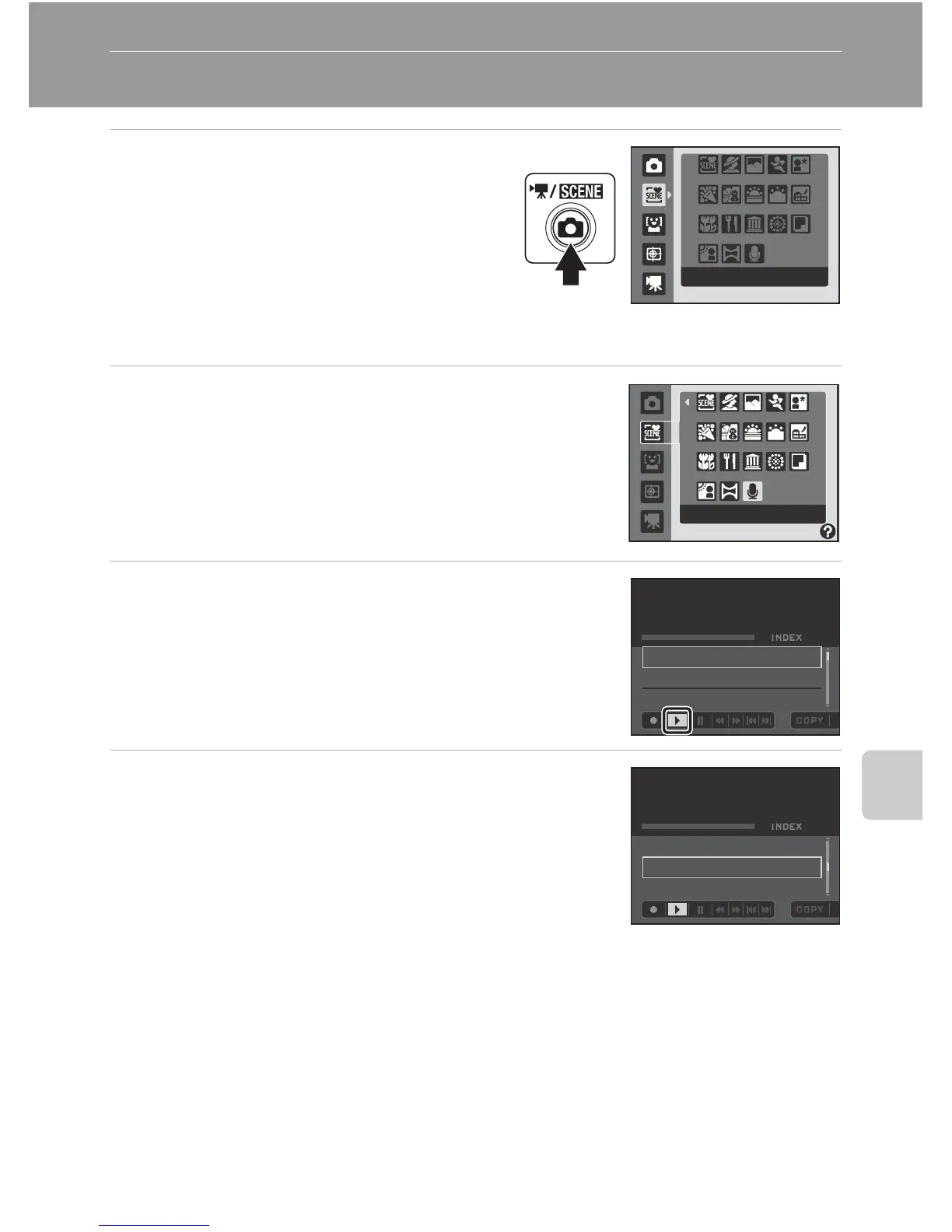
1
Display the shooting-mode
selection menu by pressing the A
button in shooting mode, and use
the rotary multi selector to choose
a scene icon.
• The icon for the scene mode that was
chosen previously will be displayed. The
default setting is x (Scene auto selector).
2
Press K, choose E Voice recording and press
the k button.
• The screen switches to the voice recording screen.
3
Press J or K on the rotary multi selector to
choose l.
4
Press H or I to choose the desired sound file
and press the k button.
• The selected sound file will be played back.
• See “Operations During Playback” (A74) for more
information.
Scene auto selector
Voice recordingVoice recording
00
:
01
:
00
001 15/05/2009 17:30
002 15/05/2009 18:30
003 26/05/2009 13:00
02
Playback
00
:
03
:
12
001 15/05/2009 17:30
002 15/05/2009 18:30
003 26/05/2009 13:00
03
Playback








 To Next Page