VAA46003-R.3659.A
- D11 ・ E7900 -
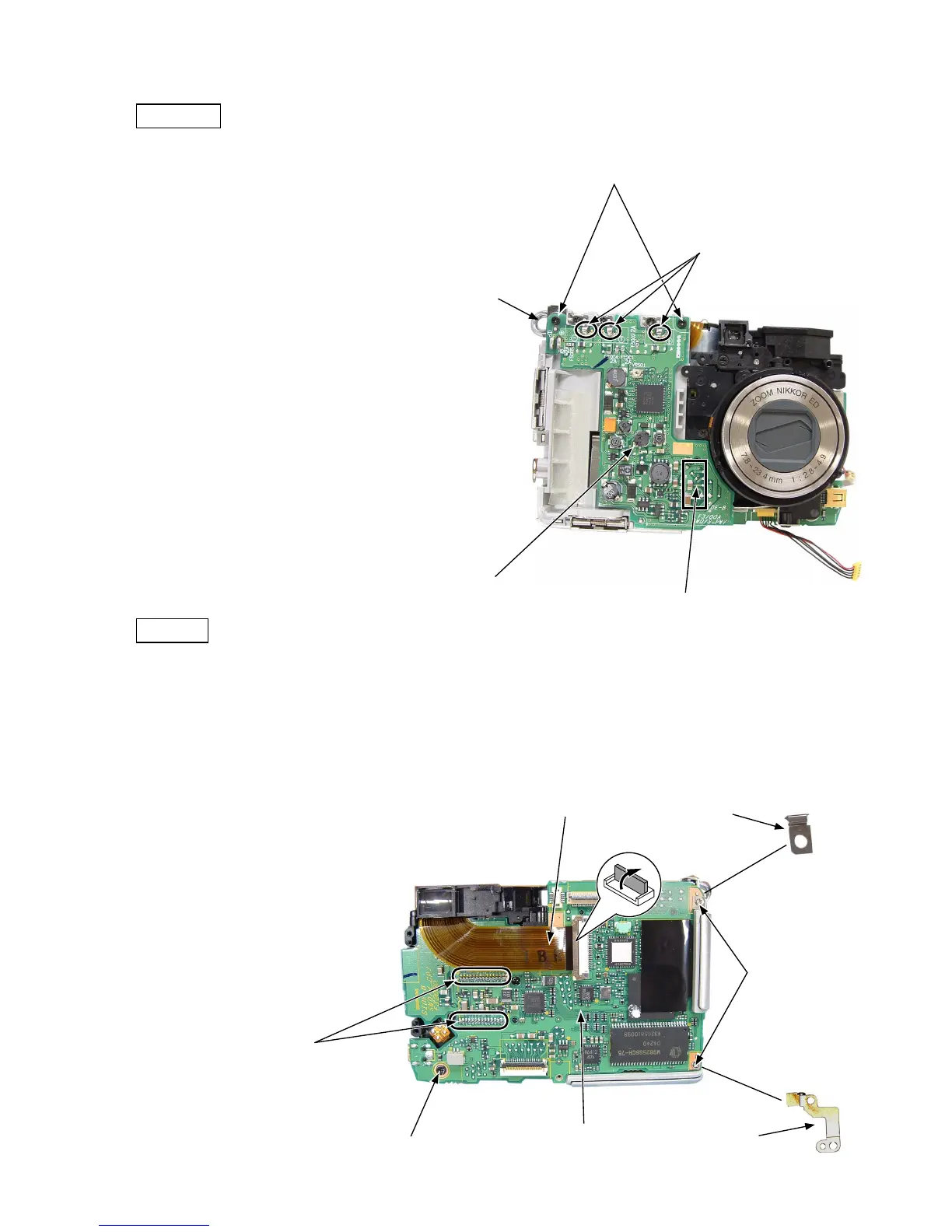
DC/DC PCB
・ Remove the solder of the armature.
・ Remove the two screws (816).
・ Remove the DC/DC PCB from the main PCB connector.
・ The strap eyelet (381) can be removed.
Armature
Screws (816)
Strap eyelet (381)
DC/DC PCB
Position of the main PCB connector (Rear surface)
Main PCB
・ Remove the FPC.
・ Perform unsoldering.
・ Remove the screw (803).
・ Remove the two screws (818).
・ Remove the lug plate (392).
・ Remove the main PCB (B1001).
・ Remove the lug plate (397).
FPC
Screw (803)
Screws (818)
Lug plate (397)
Lug plate (392)
Main PCB (B1001)
はんだ



 To Next Page