232
I
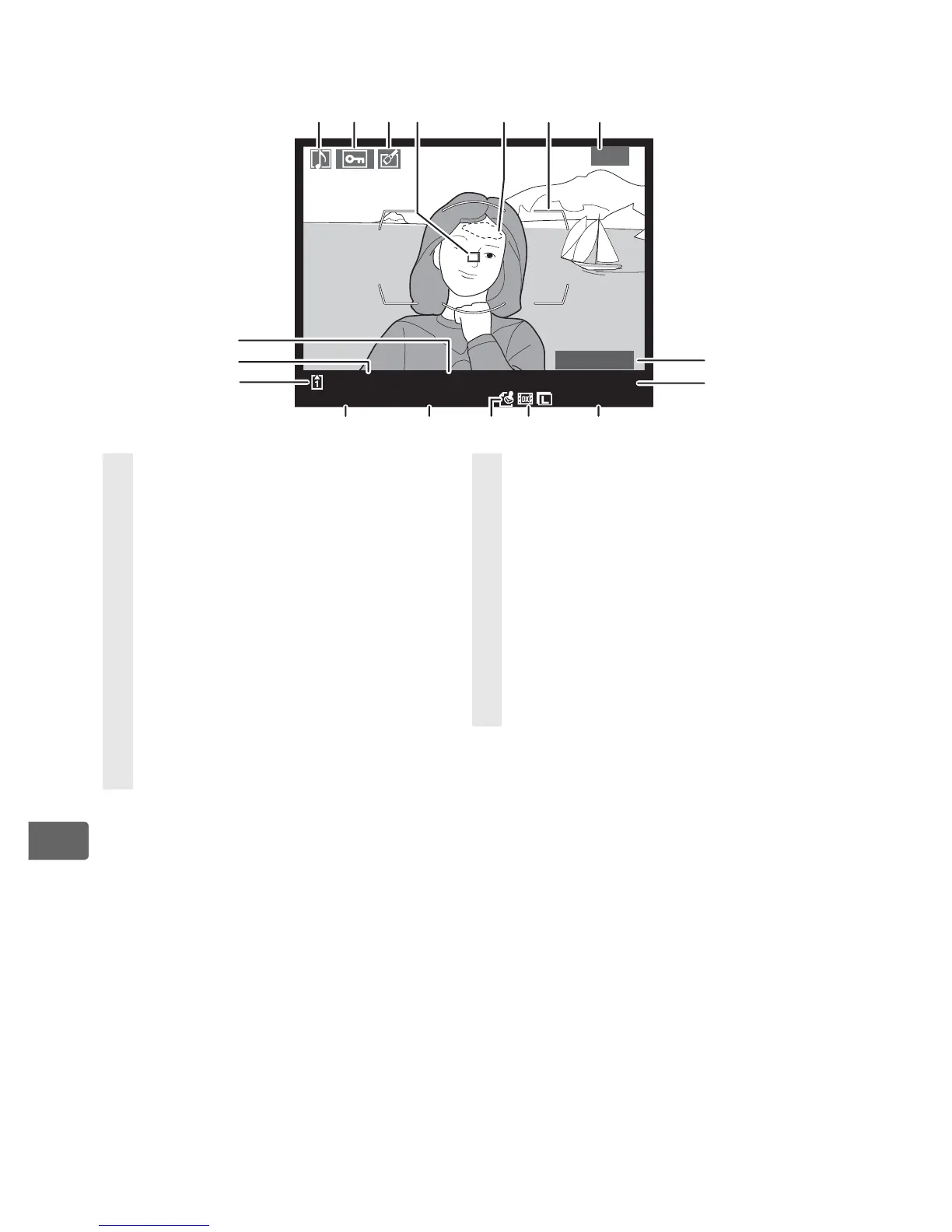
❚❚ File Information
1 Displayed only if [Focus point] is selected for [Display mode] (pg. 282).
2 Image highlights (areas of the frame that may be overexposed) are
indicated by a flashing border. Displayed only if [Highlights] is selected for
[Display mode] (pg. 282).
3 a is displayed if [DX format (24 × 16)] was selected for the [Image area]
option (pg. 60) in the shooting menu, b if [5 : 4 (30 × 24)] was selected. No
icon is displayed when [FX format (36 × 24)] is selected.
1/ 10
100
NC_
D3
D
S
C
_0001. JPG
15/12/2007 10
:
16
:
00
4256x2832
N
Highlights
1234
5
76
16
15
14
13 12 11
10
17
8
9
1 Voice memo icon ..................... 248
2 Protect status ............................ 244
3 Retouch indicator .................... 360
4 Focus point
1
.............................. 282
5 Image highlights
2
.................. 282
6 AF area brackets...................47, 95
7 Frame number/
total number of frames
8 Highlight display indicator
1
282
9 Image quality ...............................65
10 Image size ..................................... 69
11 Image area
3
................................. 60
12 Image authentication .............354
13 Time of recording....................... 39
14 Date of recording ....................... 39
15 Slot number.................................. 42
16 Folder name ...............................293
17 File name.....................................296



 To Next Page