EasyManua.ls Logo

Nikon D3 - Page 44

Nikon D3
472 pages
Print Icon
To Next Page IconTo Next Page
To Previous Page IconTo Previous Page
Loading...
18
X
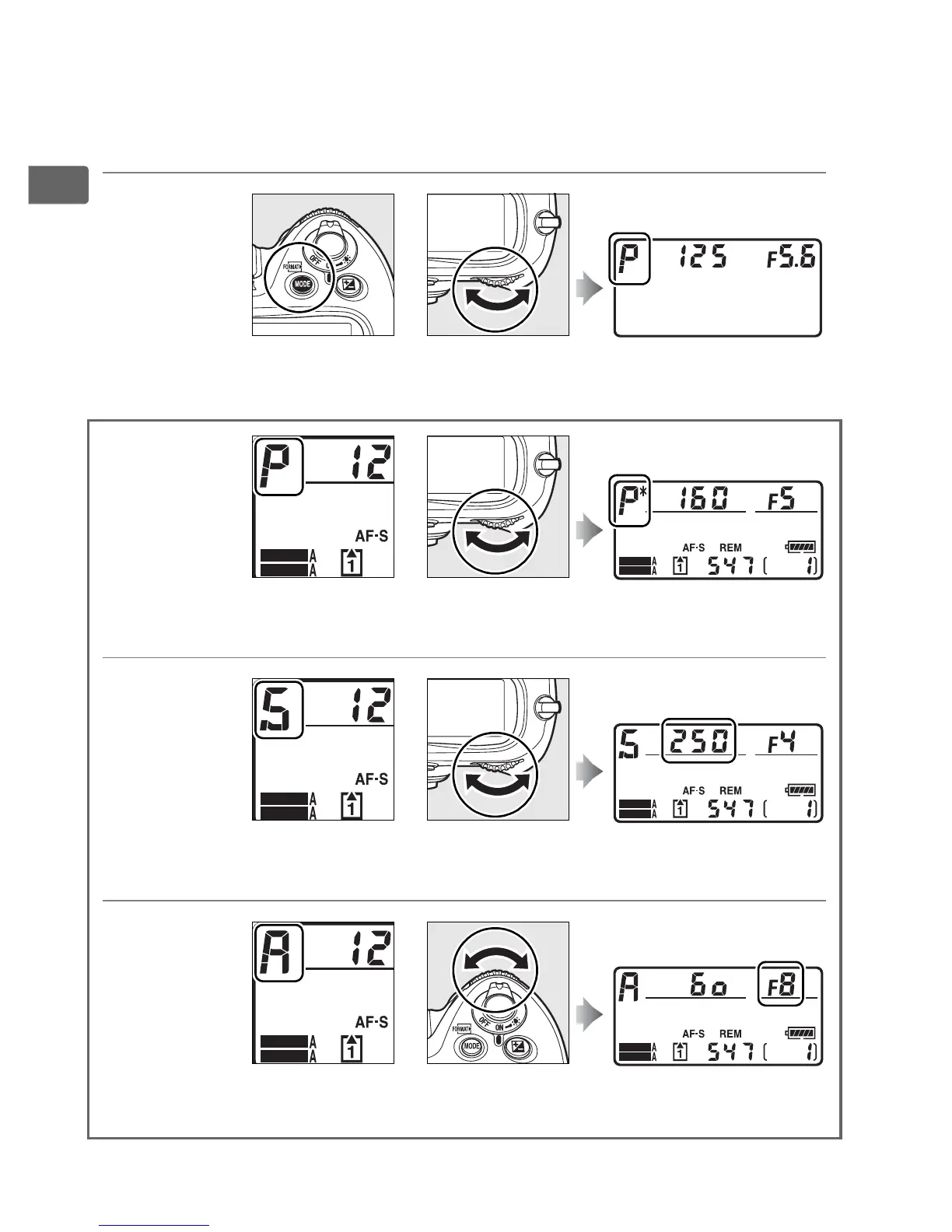
❚❚ Exposure
Press the I button and rotate the main command dial to choose
the exposure mode.
Choose the
exposure mode
(pg. 117)
Use the command dials to adjust exposure.
Choose a
combination of
aperture and
shutter speed
(exposure mode
e; pg. 119)
Choose a shutter
speed (exposure
mode f or h; pg.
120, 125)
Choose an
aperture
(exposure
mode g or h;
pg. 122, 125)
I button Main command dial Top control panel
+
SHOOT
CUSTOM
Exposure
mode e
Main
command dial
Top control panel
+
SHOOT
CUSTOM
SHOOT
CUSTOM
+
Exposure
mode f or h
Main
command dial
Top control panel
SHOOT
CUSTOM
SHOOT
CUSTOM
Exposure
mode g or h
Sub-command
dial
Top control panel
+
SHOOT
CUSTOM

Table of Contents

Other manuals for Nikon D3

Related product manuals