8
First Steps
First Steps
Inserting Batteries
Your camera uses:
• LR6 (AA) alkaline batteries (×2), or
• Nikon EN-MH1 rechargeable nickel-metal hydride (NiMH) batteries (×2), or
• ZR6 (AA) nickel manganese batteries (×2), or
• FR6/L91 (AA) lithium batteries (×2)
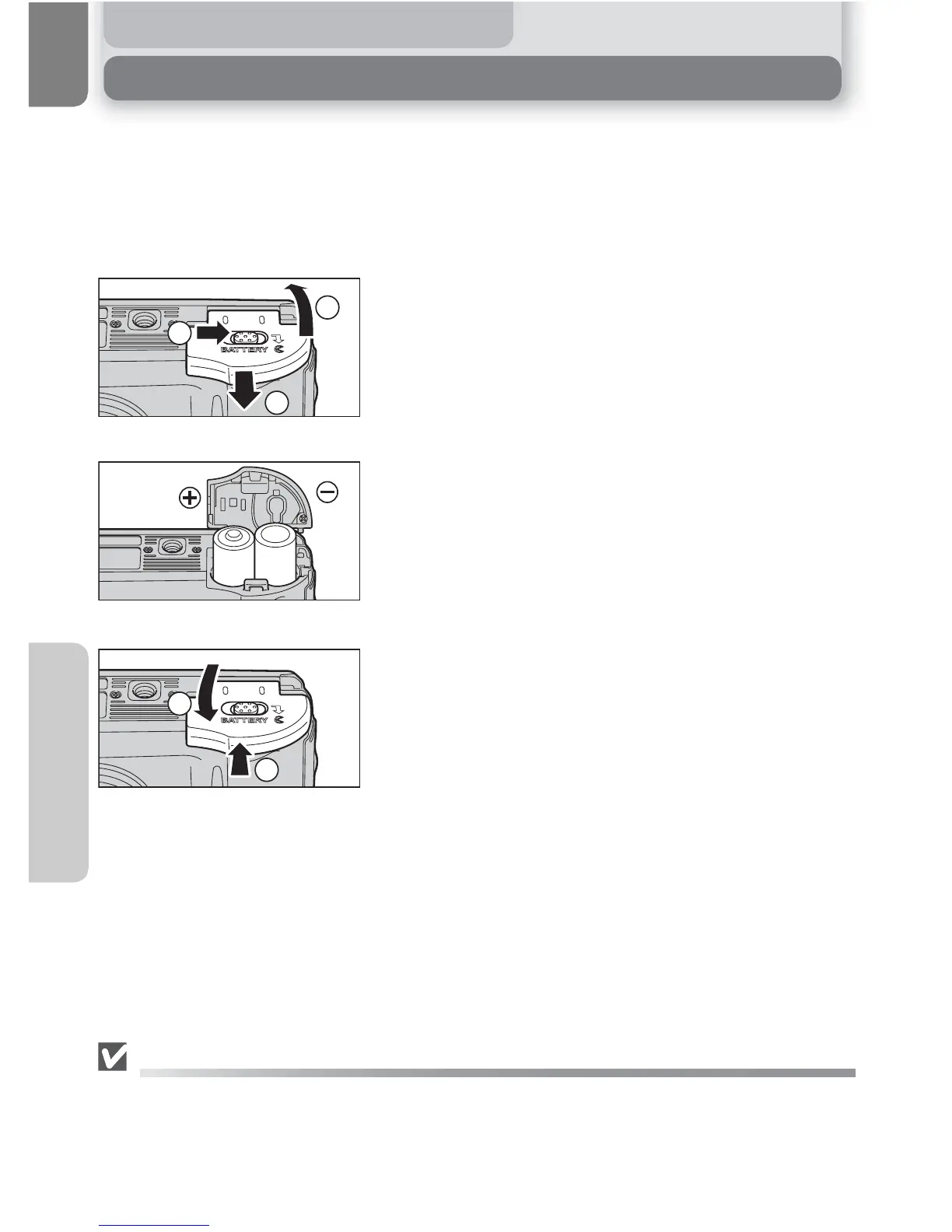
Open the battery-chamber cover
• Slide the battery-chamber cover latch as illus-
trated (c), pull the battery-chamber cover (d)
and open (e).
Insert the batteries
• Insert the batteries as shown in the label inside
the battery chamber.
Close the battery-chamber cover
• Close the battery-chamber cover (c) and slide
it in until it latches (d). Be sure that the bat-
tery-chamber cover is properly latched.
[IMPORTANT] Battery Type
To improve battery performance, select the type of battery currently inserted in the camera in the
SET-UP menu. The default setting is the type of the included batteries. When any other type of bat-
tery is used, turn the camera on and change the setting (
Q
102).
3
1
2
1
AA batteries
2
1
2
3















 To Next Page