SETIING METERING SYSTEM
+ +
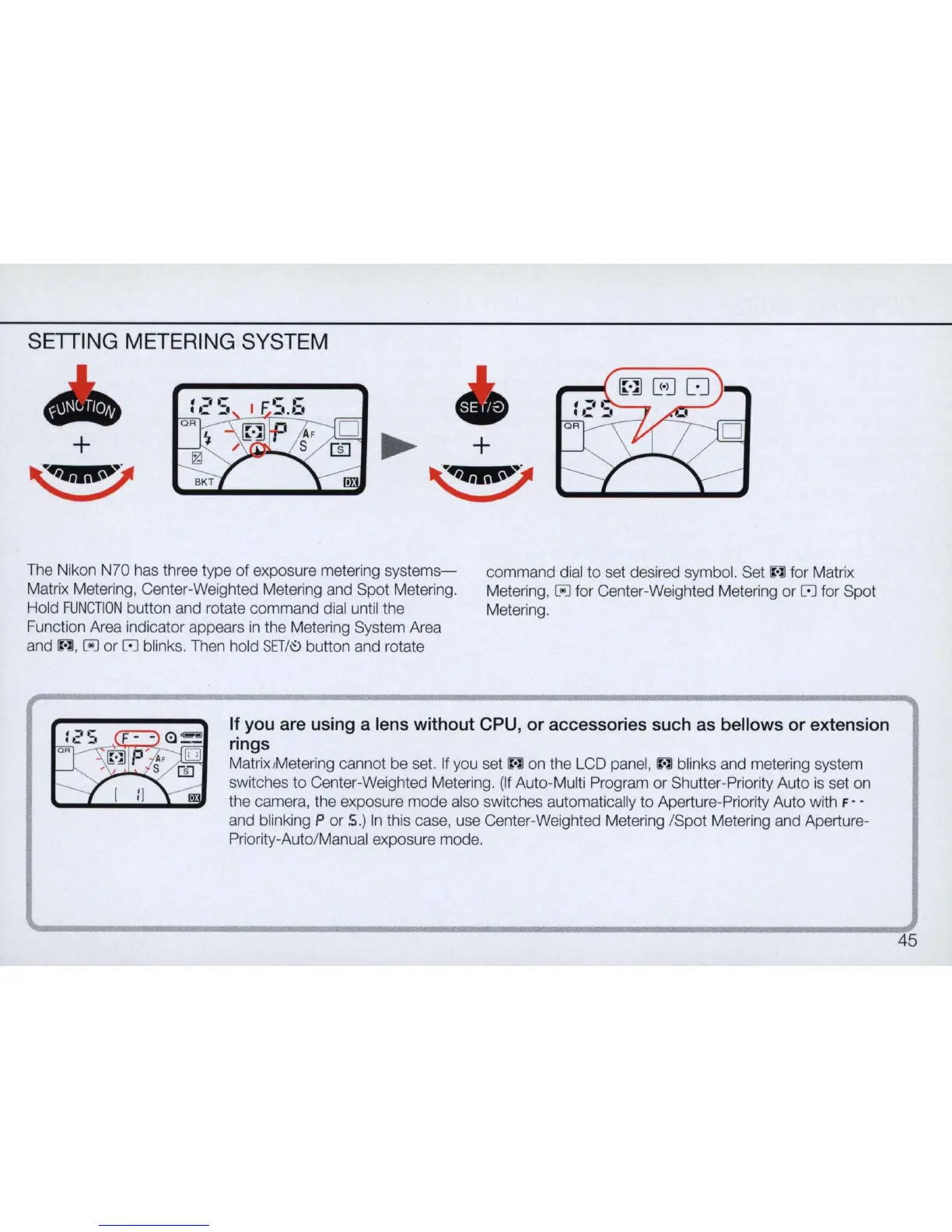
The Nikon N70 has three type of exposure metering
systems-
Matrix Metering, Center-Weighted Metering and Spot Metering.
Hold
FUNCTION
button and rotate command dial until the
Function Area indicator appears
in
the Metering System Area
and
1Wl
, [iiJ or
[0]
blinks. Then hold
SET
/
I'!)
button and rotate
command dial
to
set desired symbol. Set
IWl
for Matrix
Metering,
[iiJ for Center-Weighted Metering or
[0]
for Spot
Metering.
If you are using a lens without CPU, or accessories such as bellows or extension
rings
Matrix/Metering cannot be set.
If
you set
IWl
on the LCD panel,
IWl
blinks and metering system
switches
to
Center-Weighted Metering.
(If
Auto-Multi Program or Shutter-Priority Auto
is
set on
the camera, the exposure mode also switches automatically to Aperture-Priority Auto with
F - -
and blinking P or S
.)
In
this case, use Center-Weighted Metering /Spot Metering and Aperture-
Priority-Auto/Manual exposure mode.
45



 To Next Page