OPERATION
IN
APERTURE-PRIORI
TY
AUTO EXPOSURE MODE
+
~
+
~
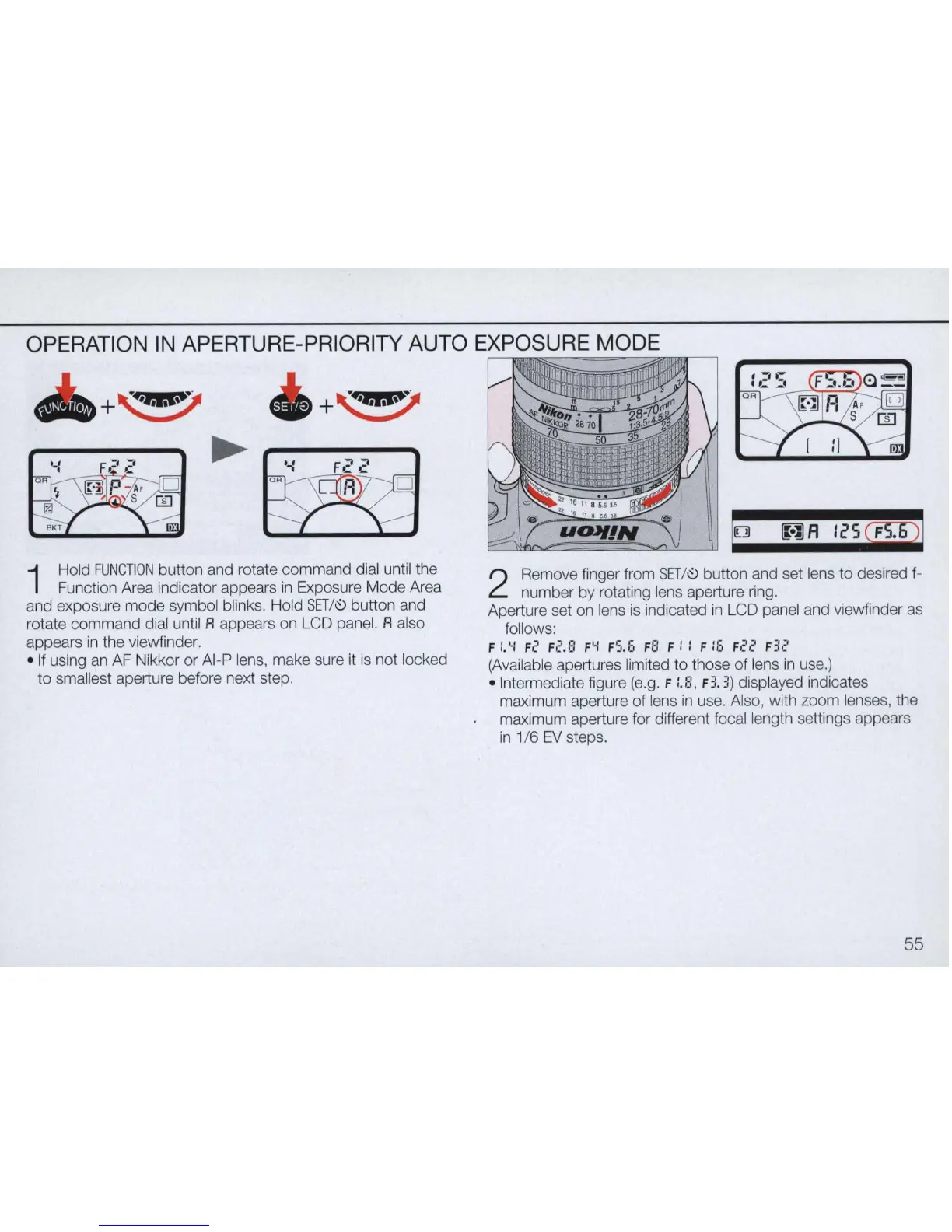
1
Hold
FUNCTION
button and rotate command dial until the
Function Area indicator appears
in
Exposure Mode Area
and exposure mode symbol blinks. Hold
SET
/
~
button and
rotate command dial until
A appears on LCD panel. A also
appears
in
the viewfinder.
o
If
using an
AF
Nikkor or
AI
-P lens, make sure it is not locked
to smallest aperture before next step.
!o
AlA
Ii'Sq;p
!
2
Remove finger from
SET
/
~ button and set lens
to
desired f-
number by rotating lens aperture ring.
Aperture set on lens is indicated
in
LCD panel and viewfinder as
follows:
F
:'o..:
Fe Fe.S F
o..:
FS.5 Fa F
::
F
:O
F
2e
F
32
(Available apertures limited
to
those
of
lens
in
use.)
o Intermediate figure (e.g. F :'8, F3. 3) displayed indicates
maximum aperture of lens
in
use. Also, with zoom lenses, the
maximum aperture for different focal length settings appears
in
1/6
EV
steps.
55



 To Next Page