3
4
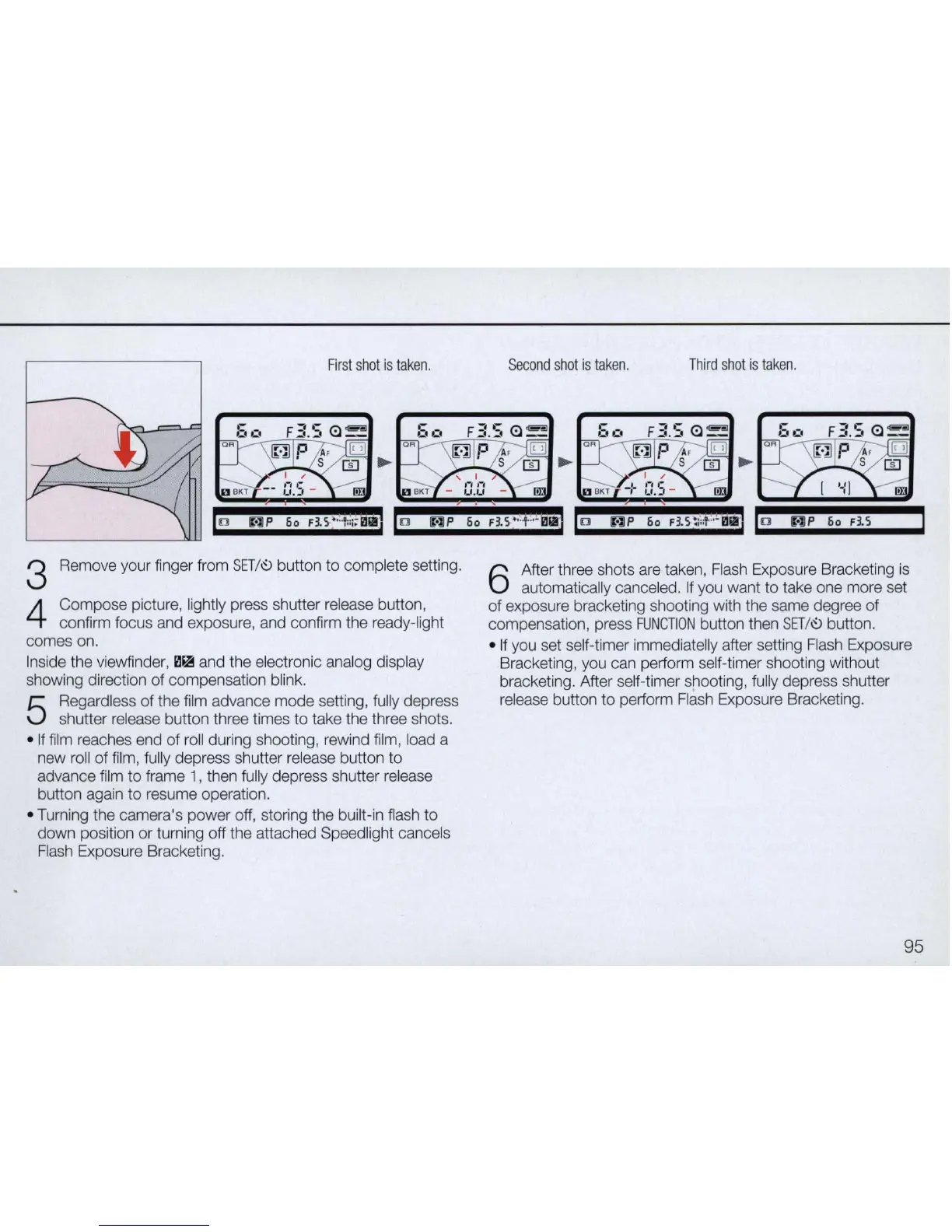
First
shot
is
taken
.
Remove your finger from
SET/'::>
button
to
comp
lete setting.
Compose
picture,
li
ght
ly press shutter release button,
confirm focus and exposure, and confirm the ready-light
comes on.
In
side the viewfinder,
il~
and the electronic analog display
showing direction
of
compensation blink.
5
Regardless
of
the film advance
mode
setting, fully depress
shutter release button three times to take the three shots .
•
If
film reaches end
of
roll during shooting, rewind film, load a
new roll
of
film, fully depress shutter release button to
advance film
to
frame 1 , then fu
ll
y depress shutter release
button again
to
resume operation .
• Turning the camera's
power
off, storing the built-in flash
to
down position
or
turning off the attached Speedlight cancels
Flash Exposure Bracketing.
Second
shot
is
taken
.
Third
shot
is
taken
.
6
After three shots are taken, Flash Exposure Bracketing is
automatica
ll
y canceled.
If
you want
to
take one more set
of exposure bracketing shooting with the same degree of
compensation, press
FUNCTION
button then
SET
/
'::>
button.
• If you set self-timer immediatelly after setting Flash Exposure
Bracketing, you can perform self-timer shooting without
bracketing. After self-timer shooting, fully depress shutter
release button
to
perform Flash Exposure Bracketing.
95



 To Next Page