4
En
Using the Buckle
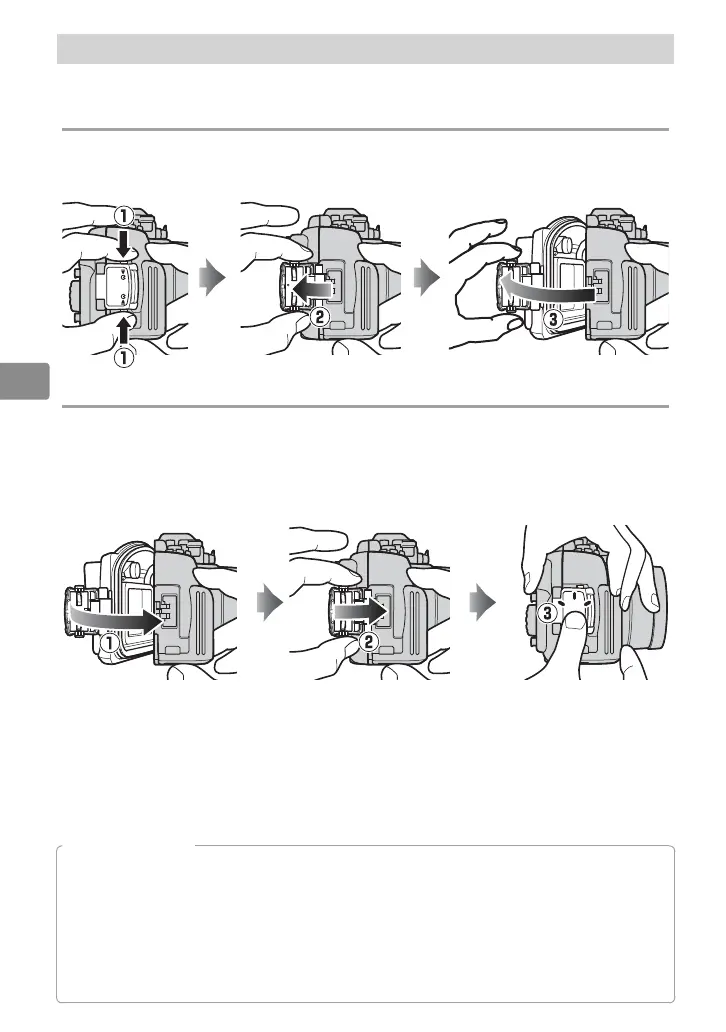
Follow the steps below to unlatch or latch the case.
Unlatching the Case
Keeping the buckle release button pressed (
q
), open the buckle (
w
) and
then open the rear cover (
e
).
Latching the Case
Close the case (
q
) and ip the buckle onto the front half (
w
), then press
the buckle closed until it clicks into place (
e
). Check that the case is
properly sealed, that the O-ring is in place, and that no foreign objects are
caught in the seal (
0
23).
D
Opening the Case
Before opening the case, be sure it is completely dry and free of dirt. After using the case
underwater, wash it in fresh water to remove any sand or other foreign objects and then dry
it thoroughly with a soft, dry cloth. Be sure that any water, sand, or other foreign objects left
on the case do not fall into the interior when the case is opened. Never operate the buckle or
buckle release button underwater.
Be careful not to drop the camera when removing it from the case.


 To Next Page