14
En
Placing the Camera in the Case
Placing the Camera in the Case
Prepare the camera for underwater photography.
1
Insert the battery and memory card.
Insert a memory card and fully-charged battery.
2
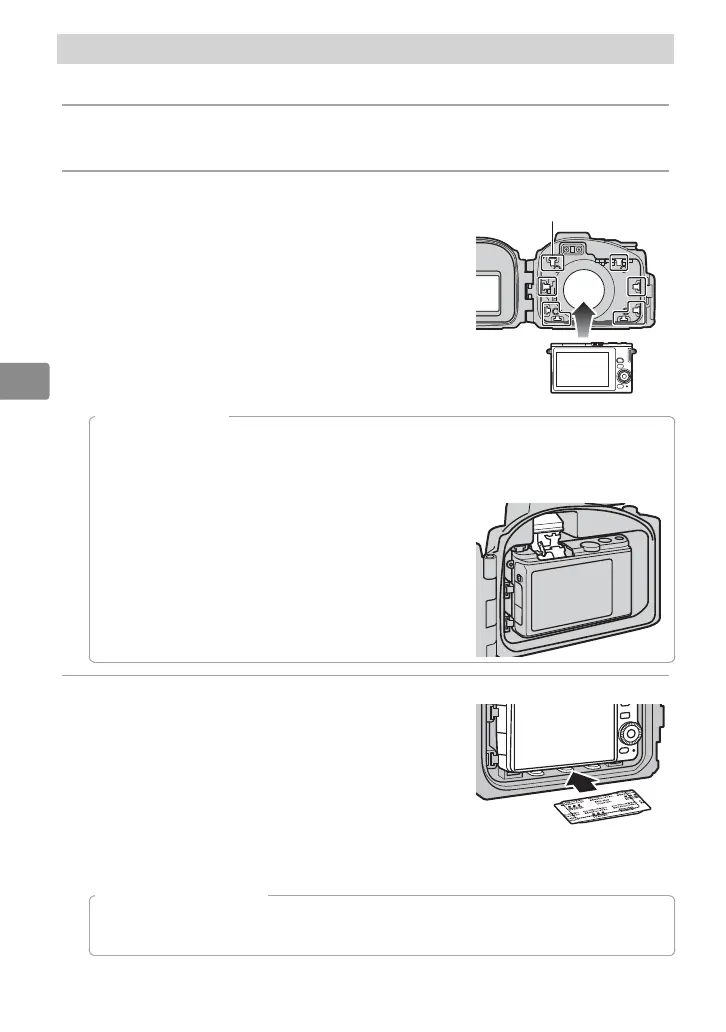
Insert the camera.
Center the camera in the camera guides with
the lens positioned in the lens window.
Camera guides
D
The Camera Strap
To ensure that the camera strap does not get caught in the seal and cause a leak, be sure
to remove the strap before placing the camera in the case.
D
Underwater Flash Units
If you will be using an optional SB-N10 underwater fl ash
unit, raise the camera’s built-in fl ash before placing the
camera in the case, as once placed in the case the fl ash
may fail to pop up on its own.
3
Insert desiccant.
To prevent condensation from forming in-
side the case, insert the supplied silica gel
desiccant between the bottom of the cam-
era and the case. Slide the desiccant to the
front, where it will not interfere with the case
closing. Improper placement could cause the
case to leak.
A
Replacing the Desiccant
Used desiccant loses its capacity to absorb moisture. We recommend replacing the
desiccant each time the case is used (
0
25).


 To Next Page