18
En
Taking Pictures
Follow the steps below to take pictures underwater.
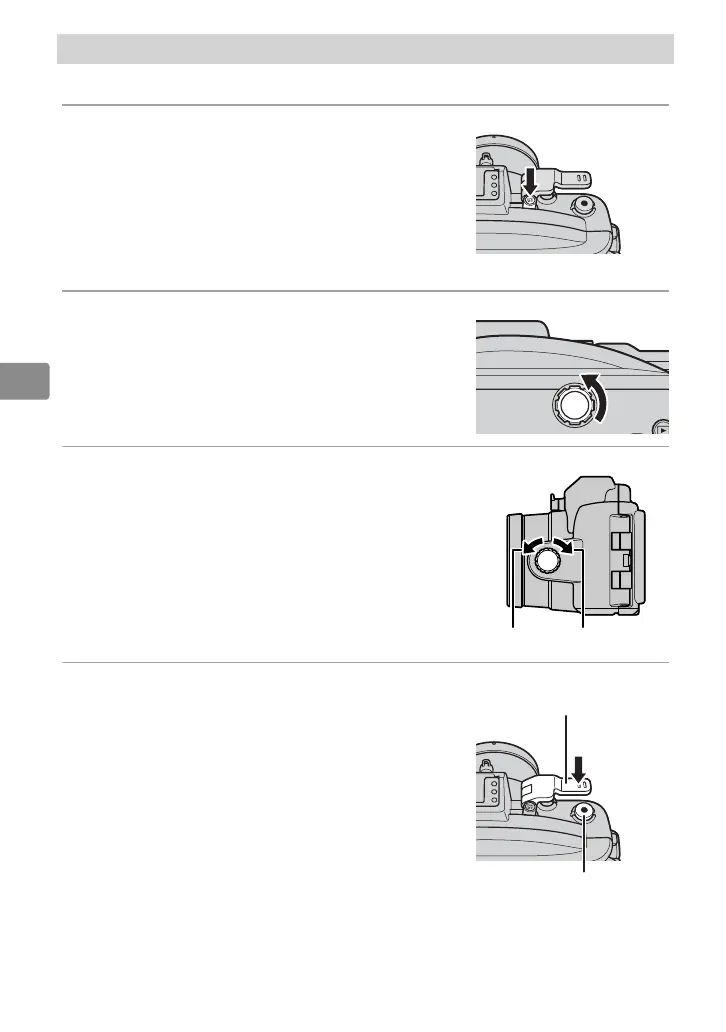
1
Turn the camera on.
Press the power switch on the waterproof
case to turn the camera on. The power lamp
will light green and the monitor will turn
on (to turn the camera o , press the power
switch again and con rm that the monitor
has turned o ).
2
Choose a mode.
Rotate the mode dial to choose a mode (J4)
or press the G button and choose a mode
from the menus (S2). For more information
on choosing a mode, see the camera manual.
3
Frame the shot.
Rotate the zoom dial to zoom in or out.
Zoom in Zoom out
4
Take the picture.
Photographs: Lightly press the shutter lever to
press the camera shutter-release button half-
way and focus, then press the shutter lever
the rest of the way down to release the shut-
ter and take a photograph.
Movies: Press the movie-record button to start
or stop recording.
Shutter lever
Movie-record button


 To Next Page