13
En
1NIKKOR 11–27.5 mm f/3.5–5.6 Lenses
1NIKKOR 11–27.5 mm f/3.5–5.6 Lenses
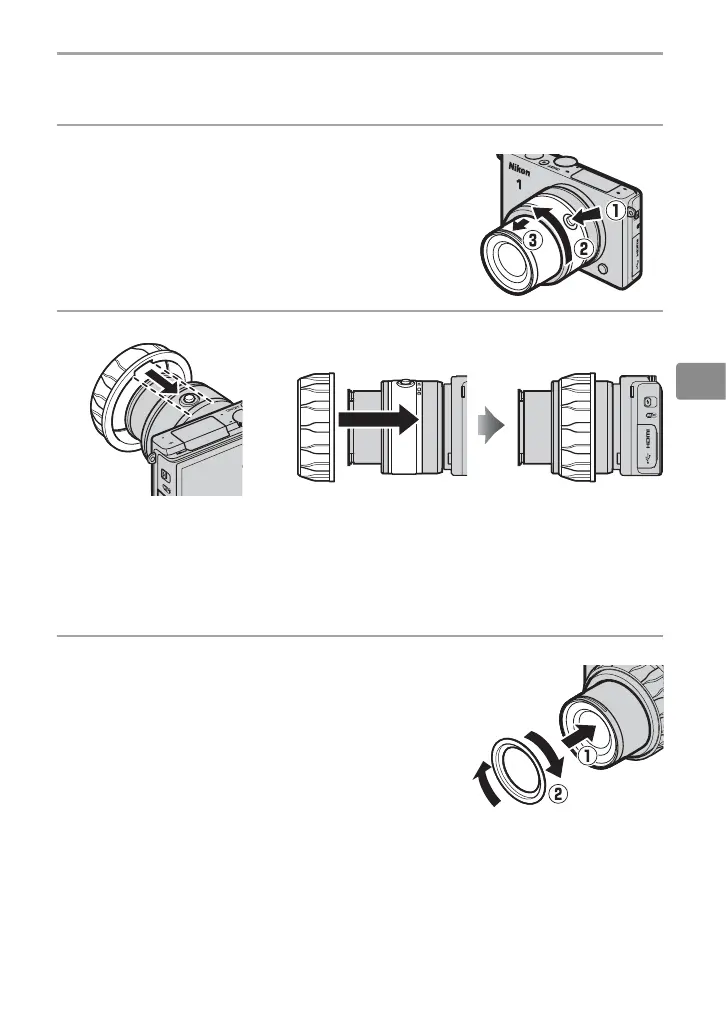
Attach the WP-ZG1010 zoom gear sleeve and WP-IR1010 inner-re ection
prevention ring.
1
Attach and extend the lens.
Keeping the retractable lens barrel button
pressed (
q
), rotate the zoom ring to extend
the lens (
w
). Note that the camera will turn
on automatically when the lens is extended;
turn the camera o before proceeding to
Step 2.
2
Attach the zoom gear sleeve.
Align the slot on the inside of
the sleeve with the retractable
lens barrel button.
Slide the sleeve straight onto the lens until it stops.
After attaching the sleeve, adjust its position so that the zoom ring
rotates freely.
3
Attach the inner-re ection prevention ring.
Attach the ring to the front of the lens as
shown. If the ring is not attached, the let-
tering on the front of the lens may appear
in photographs, having been re ected from
the inside of the waterproof case lens win-
dow.


 To Next Page