12
En
Preparing the Lens
Use a 1NIKKOR VR 10–30 mm f/3.5–5.6 PD-ZOOM or 1NIKKOR 11–27.5 mm
f/3.5–5.6 lens. Other lenses can not be used.
1NIKKOR VR 10–30 mm f/3.5–5.6 PD-ZOOM Lenses
1NIKKOR VR 10–30 mm f/3.5–5.6 PD-ZOOM Lenses
Attach the WP-ZG1020 zoom gear sleeve and WP-IS1000 inner-re ection
prevention sticker.
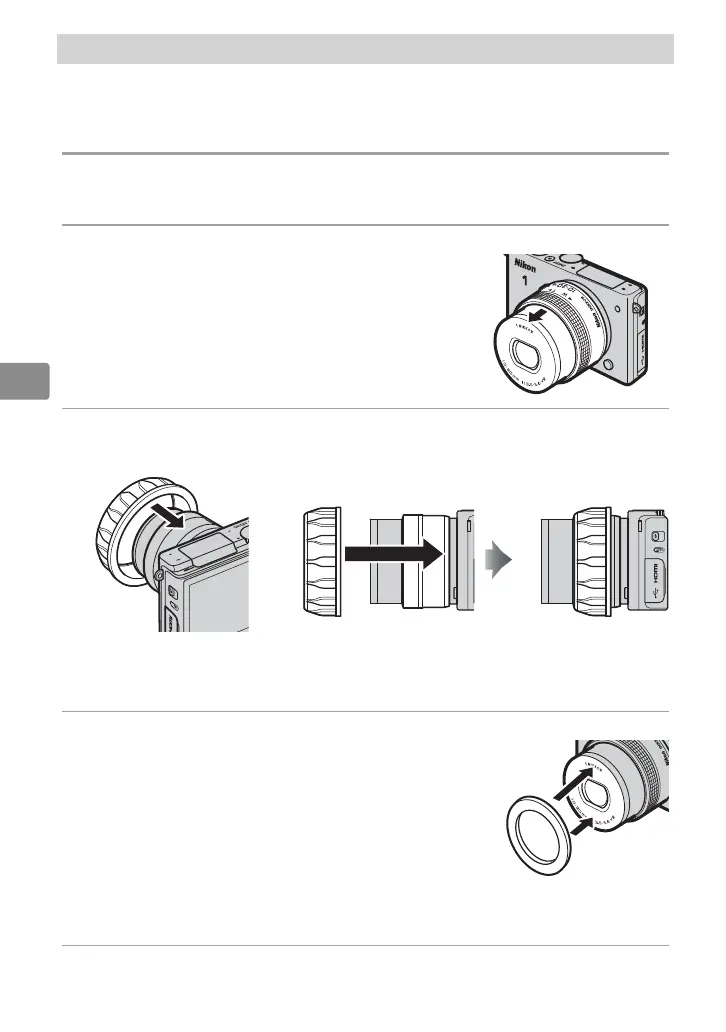
1
Attach and extend the lens.
The lens extends automatically when the
camera is turned on.
2
Attach the zoom gear sleeve.
Slide the sleeve straight onto the lens until it stops.
After attaching the sleeve, adjust its position so that the zoom ring
rotates freely.
3
Attach the inner-re ection prevention sticker.
A x the sticker to the front of the lens as
shown (if the sticker does not adhere, clean
the adhesive surface with a wipe or damp
cloth). If the sticker is not attached, the let-
tering on the front of the lens may appear in
photographs, having been re ected from the
inside of the waterproof case lens window. The sticker can be reused;
when it is not in use, reapply it to the original backing.
4
Turn the camera o .
The lens will retract automatically.


 To Next Page