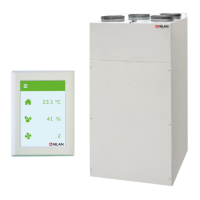
The display on the control panel provides information about the unit operation:
1. Shows the operating mode: Auto / Heating / Cooling
2. Shows: * = User option active
1-2-3 = Weekly programme active
L =Low-level operation active (humidity low)
3. Shows the set fan speed.
4. Shows the desired room temperature (not actual room temperature)
The desired room temperature can be changed by pressing ENTER once. The figure next to °C will flash,
and the temperature can be now be changed using ▲▼. The desired temperature must be confirmed by
pressing ENTER
The operating mode can be changed by double-pressing ENTER. The current mode will flash and can
now be changed using ▲▼ and confirmed with ENTER. In Auto mode, the bypass damper opens and
closes automatically, depending on temperature settings. Cooling indicates that the bypass damper
will open and heating indicates that the bypass damper is closed.
The fan speed can be changed by pressing ENTER three times. The current fan speed will flash and can
now be changed using ▲▼ and confirmed with ENTER.
Comfort 200 Top (English)
BY NILAN
5







 To Next Page